Chap 1
Sqoop is a tool for efficient bulk data transfer between Hadoop Distributed File System (HDFS) and Relational Database Management System (RDBMS).
- Sqoop 是一个用于在 Hadoop 分布式文件系统 (HDFS) 与关系数据库管理系统 (RDBMS) 之间进行高效批量数据传输的工具。
Sqoop was incubated as an Apache top-level project in March 2012.
- Sqoop 于 2012 年 3 月正式成为 Apache 顶级项目。
Sqoop is an open source tool for data transfer between Hadoop (including Hive, HBase and other HDFS-based data storages) and traditional relational databases (MySQL, Oracle, PostgreSQL, etc).
- Sqoop 是一个开源工具,用于在 Hadoop(包括 Hive、HBase 和其他基于 HDFS 的数据存储)与传统关系数据库(MySQL、Oracle、PostgreSQL 等)之间传输数据。
Sqoop can import data from a relational database into Hadoop HDFS including Hive, HBase and other HDFS-based data storages.
- Sqoop 可以将数据从关系数据库导入 Hadoop HDFS,包括 Hive、HBase 和其他基于 HDFS 的数据存储。
Sqoop can export data from HDFS to a relational database in turn MySQL, Oracle, PostgreSQL, etc.
- 相应地,Sqoop 也可以将数据从 HDFS 导出到 MySQL、Oracle、PostgreSQL 等关系数据库。
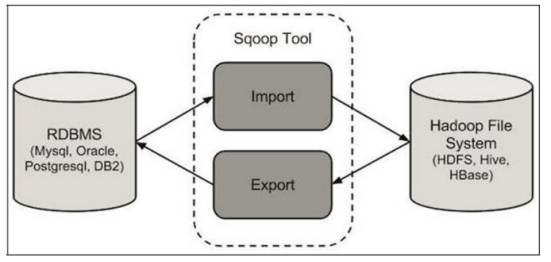
The following diagram shows the workflow of Sqoop’s import and export operations:
下图展示了 Sqoop 导入和导出操作的工作流程:
![img]()
Advantages of Sqoop1
- Sqoop1 的优点
- Connector-based, simple architecture, easy to deploy
- 基于连接器,架构简单,易于部署
- Can be used in production environment
- 可用于生产环境
Disadvantages of Sqoop1
- Sqoop1 的缺点
- Can only be called by CLI (command line), errors often happen when using wrong parameters
- 只能通过 CLI(命令行)调用,使用错误的参数时经常出错
- Unclear type mapping definition
- 类型映射定义不清晰
- Security concerns
- 安全性顾虑
- The sqoop client needs to connect directly to Hadoop and the database
- Sqoop 客户端需要直接连接 Hadoop 和数据库
- The Connector must conform to the JDBC model
- 连接器必须符合 JDBC 模型
Advantages of Sqoop2
- Sqoop2 的优点
- Introduce Sqoop Server for centralized management for Connector or other third-party plugins
- 引入了 Sqoop Server,对连接器或其他第三方插件进行集中管理
- Support multiple methods to access Sqoop Server: CLI, WEB UI, REST API
- 支持多种访问 Sqoop Server 的方式:CLI、Web UI、REST API
- Introduce role-based security mechanism, administrator can configure different roles on Sqoop Server
- 引入了基于角色的安全机制,管理员可以在 Sqoop Server 上配置不同的角色
Disadvantages of Sqoop2
- Sqoop2 的缺点
- Slightly more complex architecture
- 架构稍微复杂一些
- Difficult to config and deploy
- 配置和部署较困难
- Incomplete characteristics
- 特性不完整
- Cannot be used in production environment
- 无法用于生产环境
How Sqoop works
- Sqoop 的工作原理
- Sqoop works by translating import or export commands into MapReduce jobs
- Sqoop 的工作原理是将导入或导出命令转换为 MapReduce 作业
- In the translated MapReduce job, the InputFormat and OutputFormat can be customized to achieve import or export function
- 在转换后的 MapReduce 作业中,可以自定义 InputFormat 和 OutputFormat 以实现导入或导出功能
- Sqoop can take advantage of MapReduce’s parallelism and fault tolerance to implement import and export operations
- Sqoop 可以利用 MapReduce 的并行性和容错性来实现导入和导出操作
Sqoop import principle
- Sqoop 导入原理
- Sqoop-import tool imports a single table from RDBMS to HDFS
- Sqoop-import 工具将单个表从 RDBMS 导入到 HDFS
- Each row in the table is represented as a separate record in HDFS
- 表中的每一行在 HDFS 中表示为一条单独的记录
- The records can be stored as text files (each row or text is considered as one record) or in binary representation as Avro or SequenceFile data format
- 记录可以存储为文本文件(每一行文本视为一条记录),也可以存储为 Avro 或 SequenceFile 等二进制格式
- There is also a Sqoop-import-all-tables tool which is used to import multiple tables from RDBMS to HDFS at once, with each table’s data stored in a separate folder
- 还有一个 Sqoop-import-all-tables 工具,用于一次性将多个表从 RDBMS 导入到 HDFS,每个表的数据存储在单独的文件夹中
Sqoop-import tool has three different ways to import data
- Sqoop-import 工具提供了三种不同的数据导入方式:
- Full import: Import full amount of data
- 全量导入: 导入全部数据
- Partial import: import some columns or some rows of data
- 部分导入: 导入某些列或某些行的数据
- Incremental import: import only the new data
- 增量导入: 仅导入新数据
Sqoop export principle
- Sqoop 导出原理
- Sqoop-export tool is used to export a set of files from HDFS back to RDBMS
- Sqoop-export 工具用于将一组文件从 HDFS 导出回 RDBMS
- Currently the target table must already exist in the database
- 目前,目标表必须已存在于数据库中
- Sqoop-export tool reads the input file according to the user-specified delimiter and parses it into a set of records
- Sqoop-export 工具根据用户指定的分隔符读取输入文件,并将其解析为一组记录
Sqoop-export tool include three different ways to export data:
- Sqoop-export 工具包括三种不同的数据导出方式:
- Insert mode: The default operation is to insert the data from the file into the table using the INSERT statement
- 插入模式:默认操作是使用 INSERT 语句将文件中的数据插入到表中
- Update mode: Sqoop will use UPDATE statements to replace existing records in the database
- 更新模式:Sqoop 将使用 UPDATE 语句替换数据库中的现有记录
- Call mode: Sqoop will call a stored procedure from database for exporting each record
- 调用模式:Sqoop 将调用数据库存储过程来导出每条记录
Chapter 2
第 2 章
Sqoop is a collection of related tools. To use Sqoop, you specify the tool you want to use and the arguments that control the tool.
- Sqoop 是一组相关工具的集合。要使用 Sqoop,你需要指定想要使用的工具以及控制该工具的参数。
Sqoop-Tool - The advantage of using alias scripts is that you can avoid spelling errors by pressing the [tab] key twice when typing commands after Sqoop-
- Sqoop-Tool - 使用别名脚本的优势在于,在输入 Sqoop- 后按两次 [tab] 键可以避免拼写错误。
Sqoop’s versioning tool is one of the simplest, so simple that it doesn’t even require any parameters to be provided
- Sqoop 的版本控制工具是最简单的工具之一,简单到甚至不需要提供任何参数。
sqoop version
sqoop-version
To control the operation of each Sqoop tool, you use generic and specific arguments usages:
- 要控制每个 Sqoop 工具的操作,你需要使用通用参数和特定参数:
1 | sqoop import [GENERIC-ARGS] [TOOL-ARGS] |
a. Common arguments:
- 常用参数:
| Argument | Description | 说明 |
|---|---|---|
--connect <jdbc-uri> |
Specify JDBC connect string | 指定 JDBC 连接字符串 |
--connect-manager <class-name> |
Specify connection manager class to use | 指定要使用的连接管理器类 |
--driver <class-name> |
Manually specify JDBC driver class to use | 手动指定要使用的 JDBC 驱动类 |
--hadoop-mapred-home <dir> |
Override $HADOOP_MAPRED_HOME | 覆盖 $HADOOP_MAPRED_HOME 环境变量 |
--help |
Print usage instructions | 打印使用帮助说明 |
--password-file |
Set path for file containing authentication password | 设置包含身份验证密码的文件路径 |
-P |
Read password from console | 从控制台读取密码 |
--password <password> |
Set authentication password | 设置身份验证密码 |
--username <username> |
Set authentication username | 设置身份验证用户名 |
--verbose |
Print more information while working | 运行过程中打印更多详细信息(冗余模式) |
--hadoop-home <dir> |
Deprecated. Override $HADOOP_HOME | 已弃用。覆盖 $HADOOP_HOME 环境变量 |
--connection-param-file <filename> |
Provide optional properties file for connection parameters | 为连接参数提供可选的属性文件 |
--relaxed-isolation |
Set connection transaction isolation to read uncommitted mappers | 将连接事务隔离级别设置为“读未提交”(read uncommitted),供 mapper 使用 |
b. Generic Hadoop options
- 通用 Hadoop 选项
| Argument | Description | 说明 |
|---|---|---|
-conf <configuration file> |
specify an application configuration file | 指定应用程序配置文件 |
-D <property-value> |
use value for given property | 使用给定属性的值 |
-fs <local namenode:port> |
specify a namenode | 指定 namenode |
-jt <local jobtracker:port> |
specify a job tracker | 指定 job tracker |
-files <comma separated list of files> |
specify comma separated files to be copied to the map reduce cluster | 指定要复制到 MapReduce 集群的逗号分隔文件列表 |
-libjars <comma separated list of jars> |
specify comma separated jar files to include in the classpath. | 指定要包含在类路径 (classpath) 中的逗号分隔 jar 文件列表 |
-archives <comma separated list of archives> |
specify comma separated archives to be unarchived on the compute machines. | 指定要在计算机器上解压的逗号分隔归档文件列表 |
- The general command line syntax is:
- 通用命令行语法为:
1 | bin/hadoop command [genericOptions] [commandOptions] |
You must supply the generic arguments -conf, -D, and so on after the tool name but before any tool-specific arguments (such as --connect). Note that generic Hadoop arguments are preceded by a single dash character (-), whereas tool-specific arguments start with two dashes (–), unless they are single character arguments such as -P.
- 你必须在工具名称之后但在任何特定于工具的参数(例如 --connect)之前提供通用参数 -conf、-D 等。请注意,通用 Hadoop 参数前面有一个破折号 (-),而特定于工具的参数以两个破折号 (–) 开头,除非它们是单个字符参数(例如 -P)。
The -conf, -D, -fs and -jt arguments control the configuration and Hadoop server settings.
- -conf、-D、-fs 和 -jt 参数控制配置和 Hadoop 服务器设置。
You can use alias scripts that specify the sqoop-(toolname) syntax. For example, the script sqoop-import, or sqoop-export, etc. each selects a specific tool. These scripts are placed in the bin directory of the Sqoop installation directory:
- 你可以使用指定 sqoop-(toolname) 语法的别名脚本。例如,脚本 sqoop-import 或 sqoop-export 等分别选择特定的工具。这些脚本放置在 Sqoop 安装目录的 bin 目录中:
Available commands:
- 可用命令:
| Argument | Description | 说明 |
|---|---|---|
| codegen | Generate code to interact with database records | 生成代码以与数据库记录交互 |
| create-hive-table | Import a table definition into Hive | 将表定义导入 Hive |
| eval | Evaluate a SQL statement and display the results | 评估 SQL 语句并显示结果 |
| export | Export an HDFS directory to a database table | 将 HDFS 目录导出到数据库表 |
| help | List available commands | 列出可用命令 |
| import | Import a table from a database to HDFS | 将表从数据库导入 HDFS |
| import-all-tables | Import tables from a database to HDFS | 将多个表从数据库导入 HDFS |
| import-mainframe | Import datasets from a mainframe server to HDFS | 将数据集从大型机服务器导入 HDFS |
| job | Work with saved jobs | 处理已保存的作业 |
| list-databases | List available databases on a server | 列出服务器上可用的数据库 |
| list-tables | List available tables in a database | 列出数据库中可用的表 |
| merge | Merge results of incremental imports | 合并增量导入的结果 |
| metastore | Run a standalone Sqoop metastore | 运行独立的 Sqoop 元存储 |
| version | Display version information | 显示版本信息 |
List Databases Tool
- 列出数据库工具
The sqoop-list-databases tool is used to list which databases are available in a given database. This tool makes it easy to check whether the connection between Sqoop and a database server is successful. Since you need to specify the jdbc-uri of the database you are connecting to, as well as the username and password you need to use to establish a connection to the database, you need to specify these parameters when using the list-databases tool. Usage:
- sqoop-list-databases 工具用于列出给定数据库中可用的数据库。该工具可以轻松检查 Sqoop 与数据库服务器之间的连接是否成功。由于你需要指定要连接的数据库的 jdbc-uri,以及建立数据库连接所需的用户名和密码,因此在使用 list-databases 工具时需要指定这些参数。用法:
1
sqoop list-databases [General Parameters) [Tool Parameters]
List database schemas available on a MySQL server:
- 列出 MySQL 服务器上可用的数据库模式:
1 | sqoop list-databases --connect jdbc:mysql://localhost --username name -P |
List All Tables Tool
- 列出所有表工具
Similar to the sqoop-list-tables tool used to list all tables of a given database.
- 类似于用于列出给定数据库所有表的 sqoop-list-tables 工具。
Usage:
- 用法:
1 | sqoop list-tables [generic-args] [list-tables-args] |
Chapter 3 / 第 3 章
The import tool can be used to import a single table from RDBMS to HDFS. Each row from a table is represented as a separate record in HDFS.
- 导入工具可用于将单个表从 RDBMS 导入到 HDFS。表中的每一行在 HDFS 中都表示为一个单独的记录。
Records can be stored in text format (one record per line), or in binary format as Avro or SequenceFile.
- 记录可以以文本格式(每行一条记录)存储,也可以以 Avro 或 SequenceFile 等二进制格式存储。
Sqoop Import Tool Usage:
- Sqoop 导入工具用法:
1
sqoop import (generic-args) (import-args)
Database Connection Parameters - Sqoop is designed to import tables from a database into HDFS. To do so, you must specify a connect string that describes how to connect to the database. The connect string is similar to a URL, and is passed to Sqoop command with the --connect argument. This describes the server and database to connect to, it may also specify the port. For example:
sqoop import --connect jdbc:mysql://database.example.com/employees- 数据库连接参数 - Sqoop 旨在将数据库中的表导入到 HDFS。为此,您必须指定一个连接字符串,描述如何连接到数据库。连接字符串类似于 URL,并通过 --connect 参数传递给 Sqoop 命令。这描述了要连接的服务器和数据库,还可能指定端口。例如:
sqoop import --connect jdbc:mysql://database.example.com/employees
- 数据库连接参数 - Sqoop 旨在将数据库中的表导入到 HDFS。为此,您必须指定一个连接字符串,描述如何连接到数据库。连接字符串类似于 URL,并通过 --connect 参数传递给 Sqoop 命令。这描述了要连接的服务器和数据库,还可能指定端口。例如:
You should use the full hostname or IP address of the database host that can be seen by all your remote nodes.
- 您应当使用所有远程节点都能看到的数据库主机的完整主机名或 IP 地址。
You might need to authenticate against the database before you can access it. You can use the username to supply a username to the database. Sqoop provides couple of different ways to supply a password, secure and non-secure, to the database which is detailed below.
- 在访问数据库之前,您可能需要进行身份验证。您可以使用 username 向数据库提供用户名。Sqoop 提供了几种不同的方式向数据库提供密码(安全和非安全方式),详见下文。
Secure way of supplying password to the database. You should save the password in a file on the users home directory with 400 permissions and specify the path to that file using the
--password-fileargument, and is the preferred method of entering credentials. Sqoop will then read the password from the file and pass it to the MapReduce cluster using secure means without exposing the password in the job configuration. The file containing the password can either be on the Local FS or HDFS. For example:sqoop import --connect jdbc:mysql://127.0.0.1:3306/employees --username niit --password-file ${user.home}/.password- 向数据库提供密码的安全方式。您应该将密码保存在用户主目录下权限为 400 的文件中,并使用
--password-file参数指定该文件的路径,这是输入凭据的首选方法。随后 Sqoop 将从文件中读取密码,并使用安全手段将其传递给 MapReduce 集群,而不会在作业配置中暴露密码。包含密码的文件可以在本地文件系统或 HDFS 上。例如:sqoop import --connect jdbc:mysql://127.0.0.1:3306/employees --username niit --password-file ${user.home}/.password
- 向数据库提供密码的安全方式。您应该将密码保存在用户主目录下权限为 400 的文件中,并使用
Another way of supplying passwords is using the
--Pargument which will read a password from a console prompt.- 另一种提供密码的方法是使用
--P参数,它将从控制台提示符读取密码。
- 另一种提供密码的方法是使用
Cryptographic credentials can also be transmitted between nodes of a MapReduce cluster using insecure means. For example:
sqoop import --connect jdbc:mysql://database.example.com/employees --username aaron --password 12345- 加密凭据也可以通过非安全手段在 MapReduce 集群的节点之间传输。例如:
sqoop import --connect jdbc:mysql://database.example.com/employees --username aaron --password 12345
- 加密凭据也可以通过非安全手段在 MapReduce 集群的节点之间传输。例如:
Sqoop typically imports data from a table, use --table argument to select which table to import from. For example,
--tableemployees. This argument can also identify a VIEW or other table-like entity in a database.- Sqoop 通常从表中导入数据,使用 --table 参数选择要从中导入的表。例如,
--table employees。此参数还可以标识数据库中的视图或其他类表实体。
- Sqoop 通常从表中导入数据,使用 --table 参数选择要从中导入的表。例如,
Import control arguments:
- 导入控制参数:
| Argument | Description | 说明 |
|---|---|---|
| --append | Append data to an existing dataset in HDFS | 将数据追加到 HDFS 中现有的数据集中 |
| --as-avrodatafile | Imports data to Avro Data Files | 将数据导入为 Avro 数据文件 |
| --as-sequencefile | Imports data to SequenceFiles | 将数据导入为 SequenceFiles |
| --as-textfile | Imports data as plain text (default) | 将数据导入为纯文本(默认) |
| --as-parquetfile | Imports data to Parquet Files | 将数据导入为 Parquet 文件 |
| --boundary-query <statement> | Boundary query to use for creating splits | 用于创建分片的边界查询语句 |
| --columns <col,col…> | Columns to import from table | 从表中导入的特定列 |
| --delete-target-dir | Delete the import target directory if it exists | 如果导入目标目录已存在,则将其删除 |
| --direct | Use direct connector if exists for the database | 如果数据库存在直接连接器,则使用它 |
| --fetch-size <n> | Number of entries to read from database at once. | 一次从数据库读取的条目数。 |
| --inline-lob-limit <n> | Set the maximum size for an inline LOB | 设置内联 LOB 的最大大小 |
| -m, --num-mappers <n> | Use n map tasks to import in parallel | 使用 n 个 map 任务进行并行导入 |
| -e, --query <statement> | Import the results of statement. | 导入查询语句的结果。 |
| --split-by <column-name> | Column of the table used to split work units. Cannot be used with --autoreset-to-one-mapper option. | 用于切分工作单元的表列。不能与 --autoreset-to-one-mapper 选项同时使用。 |
| --split-limit <n> | Upper Limit for each split size. This only applies to Integer and Date columns. For date or timestamp fields it is calculated in seconds. | 每个分片大小的上限。仅适用于整数和日期列。对于日期或时间戳字段,它以秒为单位计算。 |
| --autoreset-to-one-mapper | Import should use one mapper if a table has no primary key and no split-by column is provided. Cannot be used with --split-by <col> option. | 如果表没有主键且未提供 split-by 列,则导入应使用一个 mapper。不能与 --split-by <col> 选项同时使用。 |
| --table <table-name> | Table to read | 要读取的表名 |
| --target-dir <dir> | HDFS destination dir | HDFS 目标目录 |
| --temporary-rootdir <dir> | HDFS directory for temporary files created during import (overrides default “_sqoop”) | 导入期间创建临时文件的 HDFS 目录(覆盖默认的 “_sqoop”) |
| --warehouse-dir <dir> | HDFS parent for table destination | 表目标的 HDFS 父目录 |
| --where <where clause> | WHERE clause to use during import | 导入期间使用的 WHERE 子句 |
| -z, --compress | Enable compression | 启用压缩 |
| --compression-codec <c> | Use Hadoop codec (default gzip) | 使用 Hadoop 编解码器(默认为 gzip) |
| --null-string <null-string> | The string to be written for a null value for string columns | 字符串列中 null 值的写入字符串 |
| --null-non-string <null-string> | The string to be written for a null value for non-string columns | 非字符串列中 null 值的写入字符串 |
- The --null-string and --null-non-string arguments are optional. If not specified, then the string “null” will be used.
- --null-string 和 --null-non-string 参数是可选的。如果未指定,将使用字符串 “null”。
- You can select a subset of columns and control their ordering by using the --columns argument. This should include a comma-delimited list of columns to import. For example:
--columns "name, employee_id, jobtitle".- 您可以使用 --columns 参数选择列的子集并控制它们的顺序。这应包含以逗号分隔的导入列列表。例如:
--columns "name, employee_id, jobtitle"。
- 您可以使用 --columns 参数选择列的子集并控制它们的顺序。这应包含以逗号分隔的导入列列表。例如:
- You can control which rows are imported by adding a SQL WHERE clause to the import statement. By default, Sqoop generates statements of the form SELECT <column list> FROM <table name>. You can append a WHERE clause to this with the --where argument. For example: --where “id > 400”. Only rows where the id column has a value greater than 400 will be imported.
- 您可以通过在导入语句中添加 SQL WHERE 子句来控制导入哪些行。默认情况下,Sqoop 生成 SELECT <列列表> FROM <表名> 格式的语句。您可以使用 --where 参数在此基础上追加 WHERE 子句。例如:–where “id > 400”。只有 id 列的值大于 400 的行才会被导入。
Free-form Query Imports / 自由格式查询导入
- Sqoop can also import the result set of an arbitrary SQL query. Instead of using the --table, columns and --where arguments, you can specify a SQL statement with the --query argument.
- Sqoop 还可以导入任意 SQL 查询的结果集。除了使用 --table、columns 和 --where 参数外,您还可以通过 --query 参数指定 SQL 语句。
- When importing a free-form query, you must specify a destination directory with --target-dir.
- 导入自由格式查询时,必须使用 --target-dir 指定目标目录。
- If you want to import the results of a query in parallel, then each map task will need to execute a copy of the query, with results partitioned by bounding conditions inferred by Sqoop. Your query must include the token $CONDITIONS which each Sqoop process will replace with a unique condition expression. You must also select a splitting column with --split-by.
- 如果您想并行导入查询结果,每个 map 任务都需要执行查询的副本,并根据 Sqoop 推断的边界条件对结果进行分区。您的查询必须包含 $CONDITIONS 标记,每个 Sqoop 进程都会将其替换为唯一的条件表达式。您还必须使用 --split-by 选择一个切分列。
Controlling Parallelism / 并行控制
- Sqoop imports data in parallel from most database sources.
- Sqoop 从大多数数据库源并行导入数据。
- You can specify the number of map tasks (parallel processes) to use to perform the import by using the -m or --num-mappers argument.
- 您可以使用 -m 或 --num-mappers 参数指定用于执行导入的 map 任务(并行进程)数量。
- By default, four tasks are used. Some databases may see improved performance by increasing this value to 8 or 16.
- 默认情况下使用四个任务。通过将此值增加到 8 或 16,某些数据库可能会看到性能提升。
- When performing parallel imports, Sqoop will identify the primary key column (if present) in a table and use it as the splitting column.
- 在执行并行导入时,Sqoop 会识别表中的主键列(如果存在)并将其用作切分列。
- The low and high values for the splitting column are retrieved from the database, and the map tasks operate on evenly-sized components of the total range.
- 切分列的最小值和最大值从数据库中检索,map 任务在总范围的均匀大小组件上运行。
- If the actual values for the primary key are not uniformly distributed across its range, then this can result in unbalanced tasks.
- 如果主键的实际值在其范围内分布不均匀,则可能导致任务不平衡。
- You should explicitly choose a different column with the --split-by argument.
- 您应该使用 --split-by 参数显式选择不同的列。
- If a table does not have a primary key defined and the --split-by <col> is not provided, then import will fail unless the number of mappers is explicitly set to one with the --num-mappers 1 option or the --autoreset-to-one-mapper option is used.
- 如果表没有定义主键且未提供 --split-by <列名>,除非使用 --num-mappers 1 选项将 mapper 数量显式设置为 1,或者使用了 --autoreset-to-one-mapper 选项,否则导入将失败。
- The option --autoreset-to-one-mapper is typically used with the import-all-tables tool to automatically handle tables without a primary key in a schema.
- --autoreset-to-one-mapper 选项通常与 import-all-tables 工具一起使用,以自动处理模式中没有主键的表。
Controlling the Import Process / 控制导入过程
- --target-dir is incompatible with --warehouse-dir.
- --target-dir 与 --warehouse-dir 不兼容。
- When using direct mode, you can specify additional arguments which should be passed to the underlying tool.
- 使用 direct(直接)模式时,您可以指定传递给底层工具的其他参数。
- By default, imports go to a new target location. If the destination directory already exists in HDFS, Sqoop will refuse to import and overwrite that directory’s contents.
- 默认情况下,导入将进入新的目标位置。如果 HDFS 中已存在目标目录,Sqoop 将拒绝导入并覆盖该目录的内容。
- If you use the --append argument, Sqoop will import data to a temporary directory and then rename the files into the normal target directory in a manner that does not conflict with existing filenames in that directory.
- 如果您使用 --append 参数,Sqoop 将把数据导入临时目录,然后以不与该目录中现有文件名冲突的方式将文件重命名为正常目标目录。
Incremental Import / 增量导入
- Incremental import: Sqoop provides an incremental import mode which can be used to retrieve only rows newer than some previously-imported set of rows.
- 增量导入:Sqoop 提供了一种增量导入模式,可用于仅检索比之前导入的一组行更新的行。
- The following arguments control incremental imports:
- 以下参数控制增量导入:
| Argument | Description | 说明 |
|---|---|---|
| --check-column (col) | Specifies the column to be examined when determining which rows to import. (the column should not be of type CHAR/NCHAR/VARCHAR/VARNCHAR/ LONGVARCHAR/LONGNVARCHAR) | 指定在确定要导入哪些行时要检查的列。(该列的类型不应为 CHAR/NCHAR/VARCHAR/VARNCHAR/ LONGVARCHAR/LONGNVARCHAR) |
| --incremental (mode) | Specifies how Sqoop determines which rows are new. Legal values for mode include append and lastmodified. | 指定 Sqoop 如何确定哪些行是新的。mode 的合法值包括 append 和 lastmodified。 |
| --last-value (value) | Specifies the maximum value of the check column from the previous import. | 指定上一次导入时检查列的最大值。 |
- Sqoop supports two types of incremental imports: append and lastmodified. You can use the incremental argument to specify the type of incremental import to perform.
- Sqoop 支持两种类型的增量导入:append 和 lastmodified。您可以使用 incremental 参数指定要执行的增量导入类型。
- You should specify append mode when importing a table where new rows are continually being added with increasing row id values. You specify the column containing the row’s id with --check-column. Sqoop imports rows where the check column has a value greater than the one specified with --last-value.
- 当导入一个不断添加新行且行 ID 值递增的表时,应指定 append 模式。您需使用 --check-column 指定包含行 ID 的列。Sqoop 将导入检查列的值大于 --last-value 指定值的行。
- An alternate table update strategy supported by Sqoop is called lastmodified mode. You should use this when rows of the source table may be updated, and each such update will set the value of a last-modified column to the current timestamp. Rows where the check column holds a timestamp more recent than the timestamp specified with --last-value are imported.
- Sqoop 支持的另一种表更新策略称为 lastmodified 模式。当源表中的行可能会被更新,且每次更新都会将 last-modified 列的值设置为当前时间戳时,应使用此模式。检查列中时间戳比 --last-value 指定的时间戳更新的行将被导入。
- At the end of an incremental import, the value which should be specified as --last-value for a subsequent import is printed to the screen. When running a subsequent import, you should specify last-value in this way to ensure you import only the new or updated data. This is handled automatically by creating an incremental import as a saved job, which is the preferred mechanism for performing a recurring incremental import. See the section on saved jobs later in this document for more information.
- 在增量导入结束时,屏幕上会打印出在后续导入中应指定为 --last-value 的值。运行后续导入时,您应以这种方式指定 last-value,以确保仅导入新的或更新的数据。通过将增量导入创建为保存的作业(saved job),可以自动处理此问题,这是执行定期增量导入的首选机制。有关更多信息,请参阅本文档后面关于保存作业的部分。
- File Formats Selection to Import: You can import data in one of two file formats: delimited text or SequenceFiles.
- 导入文件格式选择:您可以以两种文件格式之一导入数据:分隔文本或 SequenceFiles。
- Delimited text is the default import format. You can also specify it explicitly by using the --as-textfile argument. This argument will write string-based representations of each record to the output files, with delimiter characters between individual columns and rows. These delimiters may be commas, tabs, or other characters. (The delimiters can be selected; see “Output line formatting arguments.”)
- 分隔文本是默认的导入格式。您也可以使用 --as-textfile 参数显式指定它。此参数将每个记录的基于字符串的表示形式写入输出文件,各列和各行之间有分隔符。这些分隔符可以是逗号、制表符或其他字符。(可以选择分隔符;请参阅“输出行格式化参数”。)
- Output line formatting arguments:
- 输出行格式化参数:
| Argument | Description | 说明 |
|---|---|---|
| --enclosed-by <char> | Sets the escape character | 设置包围字符(原文此处描述有误,通常用于字段包围) |
| --escaped-by <char> | Sets the escape character | 设置转义字符 |
| --fields-terminated-by <char> | Sets the field separator character | 设置字段分隔符 |
| --lines-terminated-by <char> | Sets the end-of-line character | 设置行结束符 |
| --mysql-delimiters | Uses MySQL’s default delimiter set: fields: , lines: \n escaped-by: \ optionally-enclosed-by: ‘ | 使用 MySQL 的默认分隔符集:字段:, 行:\n 转义:\ 可选包围:’ |
| --optionally-enclosed-by <char> | Sets a field enclosing character | 设置字段包围字符(可选) |
Delimiters may be specified as:
- 分隔符可以指定为:
a. A character (–fields-terminated-by X)
- 一个字符 (–fields-terminated-by X)
b. An escape character (–fields-terminated-by \t). Supported escape characters are:
- 一个转义字符 (–fields-terminated-by \t)。支持的转义字符包括:
c. \b (backspace)
- \b (退格)
d. \n (newline)
- \n (换行)
e. \r (carriage return)
- \r (回车)
f. \t (tab)
- \t (制表符)
g. “ (double-quote)
- “ (双引号)
h. ‘ (single-quote)
- ‘ (单引号)
i. \ (backslash)
- \ (反斜杠)
j. \0 (NUL)
- \0 (空字符)
This will insert NULL characters between fields or lines, or will disable enclosing/escaping if used for one of the --enclosed-by, -optionally-enclosed-by, or escaped-by arguments. - 这将在字段或行之间插入 NULL 字符,或者如果用于 --enclosed-by、-optionally-enclosed-by 或 escaped-by 参数之一,则将禁用包围/转义。
The default delimiters are:
- 默认分隔符为:
a. a comma (,) for fields,
- 逗号 (,) 用于字段,
b. a newline (\n) for records,
- 换行符 (\n) 用于记录,
c. no quote character, and
- 无引号字符,以及
d. no escape character.
- 无转义字符。
The --mysql-delimiters argument is a shorthand argument which uses the default delimiters for the mysqldump program. If you use the mysqldump delimiters in conjunction with a direct-mode import (with --direct), very fast imports can be achieved.
- --mysql-delimiters 参数是一个简写参数,使用 mysqldump 程序的默认分隔符。如果将 mysqldump 分隔符与 direct 模式导入(使用 --direct)结合使用,可以实现非常快速的导入。
While the choice of delimiters is most important for a text-mode import, it is still relevant if you import to SequenceFiles with --as-sequencefile. The generated class’ toString() method will use the delimiters you specify, so subsequent formatting of the output data will rely on the delimiters you choose.
- 虽然分隔符的选择对于文本模式导入最为重要,但如果您使用 --as-sequencefile 导入 SequenceFiles,它仍然相关。生成的类的 toString() 方法将使用您指定的分隔符,因此输出数据的后续格式将依赖于您选择的分隔符。
Input parsing arguments:
- 输入解析参数:
| Argument | Description | 说明 |
|---|---|---|
| --input-enclosed-by <char> | Sets a required field encloser | 设置必选字段包围符 |
| --input-escaped-by <char> | Sets the input escape character | 设置输入转义字符 |
| --input-fields-terminated-by <char> | Sets the input field separator | 设置输入字段分隔符 |
| --input-lines-terminated-by <char> | Sets the input end-of-line character | 设置输入行结束符 |
| --input-optionally-enclosed-by <char> | Sets a field enclosing character | 设置输入字段包围字符(可选) |
- When Sqoop imports data to HDFS, it generates a Java class which can reinterpret the text files that it creates when doing a delimited-format import. The delimiters are chosen with arguments such as fields-terminated-by; this controls both how the data is written to disk, and how the generated parse() method reinterprets this data. The delimiters used by the parse() method can be chosen independently of the output arguments, by using --input-fields-terminated-by, and so on.
- 当 Sqoop 将数据导入 HDFS 时,它会生成一个 Java 类,该类可以在执行分隔格式导入时重新解释其创建的文本文件。分隔符通过 fields-terminated-by 等参数选择;这控制了数据如何写入磁盘,以及生成的 parse() 方法如何重新解释此数据。parse() 方法使用的分隔符可以通过使用 --input-fields-terminated-by 等参数独立于输出参数进行选择。
- SequenceFiles are a binary format that store individual records in custom record-specific data types. These data types are manifested as Java classes. Sqoop will automatically generate these data types for you. This format supports exact storage of all data in binary representations, and is appropriate for storing binary data (for example, VARBINARY columns), or data that will be principle manipulated by custom MapReduce programs (reading from SequenceFiles is higher-performance than reading from text files, as records do not need to be parsed).
- SequenceFiles 是一种二进制格式,将单个记录存储在自定义的特定于记录的数据类型中。这些数据类型表现为 Java 类。Sqoop 会自动为您生成这些数据类型。这种格式支持所有数据的二进制精确存储,适用于存储二进制数据(例如 VARBINARY 列),或主要由自定义 MapReduce 程序操作的数据(从 SequenceFiles 读取比从文本文件读取性能更高,因为不需要解析记录)。
- Avro data files are a compact, efficient binary format that provides interoperability with applications written in other programming languages. Avro also supports versioning, so that when, e.g., columns are added or removed from a table, previously imported data files can be processed along with new ones.
- Avro 数据文件是一种紧凑、高效的二进制格式,可提供与其他编程语言编写的应用程序的互操作性。Avro 还支持版本控制,因此,例如,当从表中添加或删除列时,可以处理以前导入的数据文件以及新文件。
- By default, data is not compressed. You can compress your data by using the deflate (gzip) algorithm with the z or --compress argument, or specify any Hadoop compression codec using the compression-codec argument. This applies to SequenceFile, text, and Avro files.
- 默认情况下,数据不压缩。您可以使用 z 或 --compress 参数使用 deflate (gzip) 算法压缩数据,或使用 compression-codec 参数指定任何 Hadoop 压缩编解码器。这适用于 SequenceFile、文本和 Avro 文件。
Importing Data into Hive / 将数据导入 Hive
- Sqoop’s import tool’s main function is to upload your data into files in HDFS. If you have a Hive metastore associated with your HDFS cluster, Sqoop can also import the data into Hive by generating and executing a CREATE TABLE statement to define the data’s layout in Hive. Importing data into Hive is as simple as adding the --hive-import option to your Sqoop command line.
- Sqoop 导入工具的主要功能是将数据上传到 HDFS 中的文件中。如果您的 HDFS 集群关联了 Hive 元存储,Sqoop 还可以通过生成并执行 CREATE TABLE 语句来定义数据在 Hive 中的布局,从而将数据导入 Hive。将数据导入 Hive 非常简单,只需在 Sqoop 命令行中添加 --hive-import 选项即可。
- If the Hive table already exists, you can specify the --hive-overwrite option to indicate that existing table in hive must be replaced. After your data is imported into HDFS or this step is omitted, Sqoop will generate a Hive script containing a CREATE TABLE operation defining your columns using Hive’s types, and a LOAD DATA INPATH statement to move the data files into Hive’s warehouse directory.
- 如果 Hive 表已存在,您可以指定 --hive-overwrite 选项,表示必须替换 Hive 中的现有表。在数据导入 HDFS 或省略此步骤后,Sqoop 将生成一个 Hive 脚本,其中包含使用 Hive 类型定义列的 CREATE TABLE 操作,以及将数据文件移动到 Hive 仓库目录的 LOAD DATA INPATH 语句。
- Hive arguments:
- Hive 参数:
| Argument | Description | 说明 |
|---|---|---|
| --hive-home <dir> | Override $HIVE_HOME | 覆盖 $HIVE_HOME |
| --hive-import | Import tables into Hive (Uses Hive’s default delimiters if none are set). | 将表导入 Hive(如果未设置分隔符,则使用 Hive 的默认分隔符)。 |
| --hive-overwrite | Overwrite existing data in the Hive table. | 覆盖 Hive 表中的现有数据。 |
| --create-hive-table | If set, then the job will fail if the target hive table exists. By default this property is false. | 如果设置,若目标 Hive 表存在,则作业将失败。默认情况下此属性为 false。 |
| --hive-table <table-name> | Sets the table name to use when importing to Hive. | 设置导入 Hive 时使用的表名。 |
| --hive-drop-import-delims | Drops \n, \r, and \01 from string fields when importing to Hive. | 导入 Hive 时从字符串字段中删除 \n, \r 和 \01。 |
| --hive-delims-replacement | Replace \n, \r, and \01 from string fields with user defined string when importing to Hive. | 导入 Hive 时用用户定义的字符串替换字符串字段中的 \n, \r 和 \01。 |
| --hive-partition-key | Name of a hive field to partition are sharded on | 用于分区的 Hive 字段名称 |
| --hive-partition-value <v> | String-value that serves as partition key for this imported into hive in this job. | 作为此次导入 Hive 作业的分区键的字符串值。 |
| --map-column-hive <map> | Override default mapping from SQL type to Hive type for configured columns. If specify commas in this argument, use URL encoded keys and values, for example, use DECIMAL(1%2C%201) instead of DECIMAL (1, 1). | 覆盖已配置列的 SQL 类型到 Hive 类型的默认映射。如果在此参数中指定逗号,请使用 URL 编码的键和值,例如,使用 DECIMAL(1%2C%201) 代替 DECIMAL (1, 1)。 |
The import-all-tables tool imports a set of tables from an RDBMS to HDFS. Data from each table is stored in a separate directory in HDFS. For the import-all-tables tool to be useful, the following conditions must be met:
- import-all-tables 工具将一组表从 RDBMS 导入到 HDFS。每个表的数据存储在 HDFS 的单独目录中。为了使 import-all-tables 工具发挥作用,必须满足以下条件:
a. Each table must have a single-column primary key or --autoreset-to-one-mapper option must be used.
- 每个表必须有一个单列主键,或者必须使用 --autoreset-to-one-mapper 选项。
b. You must intend to import all columns of each table.
- 您必须打算导入每个表的所有列。
c. You must not intend to use non-default splitting column, nor impose any conditions via a WHERE clause.
- 您不能打算使用非默认的切分列,也不能通过 WHERE 子句施加任何条件。
Import Results Validation / 导入结果验证
- To validate the exported results, you can use the --validation option.
- 要验证导出结果,可以使用 --validation 选项。
Validation Argument / 验证参数
| Argument | Description | 说明 |
|---|---|---|
| --validate | Enable validation of data copied, supports single table copy only. | 启用数据复制验证,仅支持单表复制。 |
| --validator <class-name> | Specify validator class to use. | 指定要使用的验证器类。 |
| --validation-threshold <class-name> | Specify validation threshold class to use. | 指定要使用的验证阈值类。 |
| --validation-failurehandler <class-name> | Specify validation failure handler class to use. | 指定要使用的验证失败处理程序类。 |
The purpose of validation is to compare the differences in records before and after exporting, and thus know whether the exported results are as expected.
- 验证的目的是比较导出前后的记录差异,从而了解导出的结果是否符合预期。
There are 3 basic interfaces:
- 有 3 个基本接口:
a. Validation Threshold:- Determines if the error margin between the source and target are acceptable: Absolute, Percentage Tolerant, etc. Default implementation is Absolute Validation Threshold which ensures the row counts from source and targets are the same.
- 验证阈值:- 确定源和目标之间的误差范围是否可接受:绝对、百分比容差等。默认实现是绝对验证阈值,它确保源和目标的行数相同。
b. Validation FailureHandler:- Responsible for handling failures: log an error/warning, abort, etc. Default implementation is LogOnFailureHandler that logs a warning message to the configured logger.
- 验证失败处理程序:- 负责处理失败:记录错误/警告、中止等。默认实现是 LogOnFailureHandler,它向配置的记录器记录警告消息。
c. Validator:- Drives the validation logic by delegating the decision to Validation Threshold and delegating failure handling to ValidationFailureHandler. The default implementation is RowCount Validator which validates the row counts from source and the target.
- 验证器:- 通过将决策委托给验证阈值并将失败处理委托给验证失败处理程序来驱动验证逻辑。默认实现是 RowCount 验证器,它验证源和目标的行数。
These interfaces can be found under the org.apache.sqoop.validation package. Here is a simple example of exporting HDFS data to a bar table in a database and enabling row count verification: sqoop import --connect jdbc:mysql://db.example.com/foo --table bar --target-dir /results/bar_data -validate
- 这些接口可以在 org.apache.sqoop.validation 包下找到。这是一个将 HDFS 数据导出到数据库中的 bar 表并启用行数验证的简单示例:sqoop import --connect jdbc:mysql://db.example.com/foo --table bar --target-dir /results/bar_data -validate
Importing Performance Optimization / 导入性能优化
Sqoop import tasks use 4 Map tasks by default, which is not always the best choice. Map task number can be specified by -m or --num-mappers option, which can be considered as the following ways:
- Sqoop 导入任务默认使用 4 个 Map 任务,这并不总是最佳选择。Map 任务数量可以通过 -m 或 --num-mappers 选项指定,可以考虑以下方式:
a. When the amount of data is smaller than the Block Size defined in HDFS, only one Map task should be used, which can effectively reduce the execution time of MapReduce tasks, as well as reduce the number of generated files and save disk space.
- 当数据量小于 HDFS 中定义的块大小时,应仅使用一个 Map 任务,这可以有效减少 MapReduce 任务的执行时间,以及减少生成的文件数量并节省磁盘空间。
b. When the amount of data is large, performance can be improved by increasing the parallelism, but it is not always getting better to increase it. Normally the parallelism should not exceed the maximum number of virtual CPUs that can be requested from YARN for a MapReduce task on that node (the corresponding configuration item is yarn.scheduler.maximum-allocation-vcores, which can be configured in yarn-site.xml with a default value of 4).
- 当数据量较大时,可以通过增加并行度来提高性能,但并非总是增加得越多越好。通常,并行度不应超过该节点上可从 YARN 为 MapReduce 任务请求的最大虚拟 CPU 数量(相应的配置项是 yarn.scheduler.maximum-allocation-vcores,可以在 yarn-site.xml 中配置,默认值为 4)。
You can use --fetch-size to specify the maximum number of data to be read from the database at a time when executing the import, the default value is 1000. It is recommended to consider the following aspects.
- 您可以使用 --fetch-size 指定执行导入时一次从数据库读取的最大数据量,默认值为 1000。建议考虑以下方面。
a. Whether the table to be imported is a wide table, and whether it contains large object fields or long text fields.
- 要导入的表是否为宽表,以及是否包含大对象字段或长文本字段。
b. Database Performance
- 数据库性能
Using --direct mode to import sometimes can improve performance if the database supports it. Also, using the --relaxed-isolation option to instruct Sqoop to import data using the read uncommitted isolation level can improve data transfer speed if the database supports it.
- 如果数据库支持,使用 --direct 模式导入有时可以提高性能。此外,如果数据库支持,使用 --relaxed-isolation 选项指示 Sqoop 使用读取未提交(read uncommitted)隔离级别导入数据,可以提高数据传输速度。
Chapter 4
第4章
- The Sqoop export tool can export a set of files from HDFS back to RDBMS.
- Sqoop导出工具可以将一组文件从HDFS导出回关系型数据库(RDBMS)。
- The target table must already exist in the database. The input files are read and parsed into a set of records according to the user-specified delimiters.
- 目标表必须在数据库中已经存在。输入文件会被读取,并根据用户指定的分隔符解析成一组记录。
- The default operation is to transform these into a set of INSERT statements that insert the records into the database.
- 默认操作是将这些记录转换为一组INSERT语句,从而将记录插入到数据库中。
- In “update mode,” Sqoop will generate UPDATE statements that replace existing records in the database, and in “call mode” Sqoop will call a stored procedure for each record.
- 在“更新模式”下,Sqoop将生成UPDATE语句来替换数据库中的现有记录;而在“调用模式”下,Sqoop将为每条记录调用一个存储过程。
- Syntax:- sqoop export (generic-args) (export-args)
- 语法:- sqoop export (通用参数) (导出参数)
- Export control arguments:
- 导出控制参数:
| Argument | Description | 说明 |
|---|---|---|
| --columns <col,col.col…> | Columns to export to table | 导出到表的列 |
| --direct | Use direct export fast path | 使用直接导出快速路径 |
| --export-dir <dir> | HDFS source path for the export | 导出的HDFS源路径 |
| -m,–num-mappers <n> | Use n map tasks to export in parallel | 使用n个map任务并行导出 |
| --table <table-name> | Table to populate | 要填充的表 |
| --call <stored-proc-name> | Stored Procedure to call | 要调用的存储过程 |
| --update-key <col-name> | Anchor column to use for updates. Use a comma separated list of columns if there are more than one column. | 用于更新的锚列。如果有多个列,请使用逗号分隔的列列表。 |
| --update-mode <mode> | Specify how updates are performed when new rows are found with non-matching keys in database. Legal values for mode include updateonly (default) and allowinsert. | 指定当数据库中发现不匹配键的新行时如何执行更新。模式的合法值包括 updateonly(默认)和 allowinsert。 |
| --input-null-string <null-string> | The string to be interpreted as null for string columns | 将被解释为字符串列的null的字符串 |
| --input-null-non-string <null-string> | The string to be interpreted as null for non-string columns | 将被解释为非字符串列的null的字符串 |
| --staging-table <staging-table-name> | The table in which data will be staged before being inserted into the destination table. | 数据在插入目标表之前将被暂存的表。 |
| --clear-staging-table | Indicates that any data present in the staging table can be deleted. | 表示暂存表中存在的任何数据都可以被删除。 |
| --batch | Use batch mode for underlying statement execution. | 对底层语句执行使用批处理模式。 |
When using the export tool, you must use the --export-dir parameter to specify the directory in which the source data is contained in HDFS, and specify the destination table to export to the database via --table, or specify the stored procedure to call via --call. Note --table and --call cannot be used at the same time.
- 使用导出工具时,必须使用 --export-dir 参数指定源数据在HDFS中包含的目录,并通过 --table 指定要导出到数据库的目标表,或者通过 --call 指定要调用的存储过程。注意 --table 和 --call 不能同时使用。
By default, all columns in the table are selected for export. You can also use the --columns parameter to indicate which columns to export and to control the order in which columns are exported, with values that correspond to a comma-separated list of column names.
- 默认情况下,表中的所有列都被选中进行导出。你也可以使用 --columns 参数来指示要导出哪些列,并控制列导出的顺序,其值为对应列名的逗号分隔列表。
Some databases provides a direct mode for exports as well. Use the --direct argument to specify this codepath. This may be higher-performance than the standard JDBC codepath.
- 一些数据库也提供了直接导出模式。使用 --direct 参数来指定此代码路径。这可能比标准的JDBC代码路径性能更高。
Since Sqoop breaks down export process into multiple transactions, it is possible that a failed export job may result in partial data being committed to the database. This can further lead to subsequent jobs failing due to insert collisions in some cases, or lead to duplicated data in others. You can overcome this problem by specifying a staging table via the --staging-table option which acts as an auxiliary table that is used to stage exported data. The staged data is finally moved to the destination table in a single transaction.
- 由于Sqoop将导出过程分解为多个事务,因此失败的导出作业可能会导致部分数据提交到数据库。这可能会在某些情况下导致后续作业因插入冲突而失败,或者在其他情况下导致数据重复。你可以通过 --staging-table 选项指定一个暂存表来解决这个问题,该表作为一个辅助表用于暂存导出的数据。暂存的数据最终会在一个事务中移动到目标表。
In order to use the staging facility, you must create the staging table prior to running the export job. This table must be structurally identical to the target table. This table should either be empty before the export job runs, or the --clear-staging-table option must be specified. If the staging table contains data and the --clear-staging-table option is specified, Sqoop will delete all of the data before starting the export job.
- 为了使用暂存功能,必须在运行导出作业之前创建暂存表。该表的结构必须与目标表完全相同。在导出作业运行之前,该表应该为空,或者必须指定 --clear-staging-table 选项。如果暂存表包含数据并且指定了 --clear-staging-table 选项,Sqoop将在开始导出作业之前删除所有数据。
There are two modes for exporting data, insert mode and update mode. The insert mode is generally used for full export, that is, to export data to an empty table. The update mode is sometimes used for incremental export, and the update mode has two types, the default is updateonly, and it can also be specified as allowinsert.
- 导出数据有两种模式,插入模式和更新模式。插入模式通常用于全量导出,即将数据导出到空表中。更新模式有时用于增量导出,更新模式有两种类型,默认是 updateonly,也可以指定为 allowinsert。
- Insert Mode: If not specified --update-key, Sqoop will complete the export using the default insert mode, it will convert each record into an INSERT statement to the database table, if the target table has some constraints such as unique constraints, be careful when using insert mode to avoid violating those constraints. If one record fails to insert, the entire export job will eventually fail. This insert mode is typically used to export data to a new, empty table.
- 插入模式:如果没有指定 --update-key,Sqoop将使用默认的插入模式完成导出,它会将每条记录转换为数据库表的INSERT语句。如果目标表有一些约束(如唯一约束),在使用插入模式时要小心,避免违反这些约束。如果一条记录插入失败,整个导出作业最终将失败。这种插入模式通常用于将数据导出到一个新的空表中。
- Update Mode: If --update-key is specified, the export will be done using update mode, the default UPDATE mode is updateonly, or you can add --update-mode updateonly to set it explicitly, in updateonly mode, Sqoop will only modify the dataset that already exists in the database table, each record as input will be converted into a UPDATE statement to modify the existing record, which record to modify is determined by the column specified by update-key, if a UPDATE statement does not have a corresponding record in the database, it will not insert new data, but it will not report an error, and the export operation will continue. In shorten brief, new records are not exported in the database, but only the existed records are updated. You can also specify the update mode as allowinsert by adding the --update-mode allowinsert, then you can update existing records and insert new records at the same time. Whether an update operation or an insert operation is performed on each record is determined by the column specified by --update-key.
- 更新模式:如果指定了 --update-key,导出将使用更新模式进行。默认的UPDATE模式是 updateonly,或者你可以添加 --update-mode updateonly 来显式设置。在 updateonly 模式下,Sqoop只会修改数据库表中已经存在的数据集,作为输入的每条记录将被转换为UPDATE语句来修改现有记录,要修改哪条记录由 update-key 指定的列决定。如果UPDATE语句在数据库中没有对应的记录,它不会插入新数据,但也不会报错,导出操作将继续。简而言之,新记录不会被导出到数据库中,只有存在的记录会被更新。你也可以通过添加 --update-mode allowinsert 将更新模式指定为 allowinsert,这样你可以同时更新现有记录和插入新记录。对每条记录执行更新操作还是插入操作由 --update-key 指定的列决定。
Arguments Explained:
- 参数解释:
The --export-dir argument and one of --table or --call are required. These specify the table to populate in the database (or the stored procedure to call), and the directory in HDFS that contains the source data.
- --export-dir 参数以及 --table 或 --call 中的一个是必需的。这些指定了要在数据库中填充的表(或要调用的存储过程),以及包含源数据的HDFS目录。
Legal values for --update-mode include updateonly (default) and allowinsert. The default mode is updateonly, only data updates exist, no data insertions. If you specify --update-mode to allowinsert, you can export data that does not exist in the target database to the database table while updating the data.
- --update-mode 的合法值包括 updateonly(默认)和 allowinsert。默认模式是 updateonly,只存在数据更新,没有数据插入。如果你将 --update-mode 指定为 allowinsert,你可以在更新数据的同时将目标数据库中不存在的数据导出到数据库表中。
--update-key Specifies the column to refer to when performing the update, separated by commas if there are multiple columns. Note that update will only occur when all reference columns match.
- --update-key 指定执行更新时参考的列,如果有多个列,用逗号分隔。注意,只有当所有参考列都匹配时,更新才会发生。
In call mode, Sqoop calls a stored procedure for each record to insert or update data. Stored procedures need to be created on the database in advance.
- 在调用模式下,Sqoop为每条记录调用一个存储过程来插入或更新数据。存储过程需要预先在数据库中创建。
Call Mode
调用模式
In call mode, Sqoop calls a stored procedure for each record to insert or update data. Stored procedures need to be created on the database in advance. For example, if you want to export data to a bar table under mySQL’s foo database, create a stored procedure named barproc as follows:
- 在调用模式下,Sqoop为每条记录调用一个存储过程来插入或更新数据。存储过程需要预先在数据库中创建。例如,如果你想将数据导出到mySQL的foo数据库下的bar表中,可以创建一个名为barproc的存储过程,如下所示:
1 | use foo; |
Then write the Sqoop command, Sqoop will call a stored procedure named barproc for exporting each record in /results/bar data.
- 然后编写Sqoop命令,Sqoop将调用名为barproc的存储过程来导出 /results/bar data 中的每条记录。
1 | $ sqoop-export --connect jdbc:mysql://db.example.com/foo --call barproc \--export-dir /results/bar_data |
Export and Transaction
导出与事务
- The Sqoop export operation turns the input records into INSERT statements, an INSERT statement can insert up to 100 records.
- Sqoop导出操作将输入记录转换为INSERT语句,一条INSERT语句最多可以插入100条记录。
- Tasks responsible for writing to the database will commit a transaction for every 1,000 records they receive, which guarantees that the transaction buffer does not overflow and avoids the risk of memory exhaustion.
- 负责写入数据库的任务将每接收1,000条记录提交一次事务,这保证了事务缓冲区不会溢出,并避免了内存耗尽的风险。
Export Failure Handling
导出失败处理
Exports may fail for a number of reasons:
- 导出可能会因为多种原因失败:
- Loss of connectivity from the Hadoop cluster to the database (either due to hardware fault, or server software crashes)
- 从Hadoop集群到数据库的连接丢失(由于硬件故障或服务器软件崩溃)
- Attempting to INSERT a row which violates a consistency constraint (for example, inserting a duplicate primary key value)
- 试图插入违反一致性约束的行(例如,插入重复的主键值)
- Attempting to parse an incomplete or malformed record from the HDFS source data
- 试图从HDFS源数据中解析不完整或格式错误的记录
- Attempting to parse records using incorrect delimiters(, ; : -)
- 试图使用错误的分隔符(, ; : -)解析记录
- Capacity issues (such as insufficient RAM or disk space)
- 容量问题(如RAM或磁盘空间不足)
Exporting Data from Hive
从Hive导出数据
Sqoop does not support exporting data directly from Hive tables, you can only export data from HDFS with --export-dir option, steps are as follows:
- Sqoop不支持直接从Hive表导出数据,你只能使用 --export-dir 选项从HDFS导出数据,步骤如下:
Determine the structure of the Hive table to be exported, whether it is a partitioned table, whether compression is enabled, etc.
- 确定要导出的Hive表的结构,是否是分区表,是否启用了压缩等。
Determine the actual storage location in HDFS for the data in the Hive table.
- 确定Hive表中数据在HDFS中的实际存储位置。
Determine the delimiter settings for the source data.
- 确定源数据的分隔符设置。
Create a table with the same structure in the database based on the Hive table for exporting data.
- 根据Hive表在数据库中创建一个具有相同结构的表用于导出数据
Write a command for exporting the data into the target table in the database using the Sqoop export tool, noting that:
- 编写命令使用Sqoop导出工具将数据导出到数据库的目标表中,注意:
- Use --export-dir to correctly specify the directory where the Hive data in HDFS is located 使用 --export-dir 正确指定Hive数据在HDFS中的位置目录
- The delimiter settings should be matched with the source table 分隔符设置应与源表匹配
Exporting Data from HBase
从HBase导出数据
Sqoop does not support exporting data directly from HBase tables, but it can be done indirectly with the help of Hive tables, as follows:
- Sqoop不支持直接从HBase表导出数据,但可以借助Hive表间接完成,如下所示:
- Create an external tables based on HBase table in Hive.
- 在Hive中基于HBase表创建外部表。
- Create the Hive internal table based on the Hive external table we just created.
- 基于刚刚创建的Hive外部表创建Hive内部表。
- Load the data from the Hive external table into the Hive internal table.
- 将数据从Hive外部表加载到Hive内部表中。
- Export the data from the Hive internal table to the target table that we created in advance in the database.
- 将数据从Hive内部表导出到我们预先在数据库中创建的目标表。
- Clean up the Hive temporary table if necessary.
- 如有必要,清理Hive临时表。
Export Results Validation
导出结果验证
- To validate the exported results, you can use the --validation option.
- 要验证导出结果,可以使用 --validation 选项。
Validation Argument
验证参数
| Argument | Description | 说明 |
|---|---|---|
| --validate | Enable validation of data copied, supports single table copy only. | 启用复制数据的验证,仅支持单表复制。 |
| --validator <class-name> | Specify validator class to use. | 指定要使用的验证器类。 |
| --validation-threshold <class-name> | Specify validation threshold class to use. | 指定要使用的验证阈值类。 |
| --validation-failurehandler <class-name> | Specify validation failure handler class to use. | 指定要使用的验证失败处理程序类。 |
The purpose of validation is to compare the differences in records before and after exporting, and thus know whether the exported results are as expected.
- 验证的目的是比较导出前后记录的差异,从而知道导出结果是否符合预期。
There are 3 basic interfaces:
- 有3个基本接口:
- Validation Threshold:- Determines if the error margin between the source and target are acceptable: Absolute, Percentage Tolerant, etc. Default implementation is Absolute ValidationThreshold which ensures the row counts from source and targets are the same.
- 验证阈值:- 确定源和目标之间的误差范围是否可接受:绝对值、百分比容忍度等。默认实现是绝对验证阈值,确保源和目标的行数相同。
- Validation FailureHandler:- Responsible for handling failures: log an error/warning, abort, etc. Default implementation is LogOnFailureHandler that logs a warning message to the configured logger.
- 验证失败处理程序:- 负责处理失败:记录错误/警告、中止等。默认实现是LogOnFailureHandler,将警告消息记录到配置的日志记录器。
- Validator:- Drives the validation logic by delegating the decision to Validation Threshold and delegating failure handling to ValidationFailureHandler. The default implementation is RowCount Validator which validates the row counts from source and the target.
- 验证器:- 通过将决策委托给验证阈值并将失败处理委托给验证失败处理程序来驱动验证逻辑。默认实现是行数验证器,验证源和目标的行数。
These interfaces can be found under the org.apache.sqoop.validation package.
- 这些接口可以在 org.apache.sqoop.validation 包下找到。
1 | a.sqoop export --connect jdbc:mysql://db.example.com/foo --table bar \ |
Export Performance Optimization
导出性能优化
When target database supports, using the --direct parameter in the command may improve the export performance.
- 当目标数据库支持时,在命令中使用 --direct 参数可能会提高导出性能。
By default, Sqoop’s export function executes one INSERT statement for each row of data exported. If you want to improve the export speed when the data volume is large, you can set a single INSERT statement to insert multiple rows of data in bulk:
- 默认情况下,Sqoop的导出功能为每行导出的数据执行一条INSERT语句。如果要在数据量较大时提高导出速度,可以设置一条INSERT语句批量插入多行数据:
- Add --batch option to the command to enable JDBC batch processing
- 在命令中添加 --batch 选项以启用JDBC批处理
- Modify the number of record rows that can be exported in bulk for each SQL statement
- 修改每个SQL语句可以批量导出的记录行数
- Set the number of query statements submitted by a single transaction
- 设置单个事务提交的查询语句数量
With -Dsqoop.export.statements.per.transaction=10000, we can specify how many INSERT statements will be executed in a single transaction. A higher value generally helps improve the performance, but depending on the database.
- 使用 -Dsqoop.export.statements.per.transaction=10000,我们可以指定在一个事务中执行多少条INSERT语句。较高的值通常有助于提高性能,但这取决于数据库。
By adding -Djdbc.transaction.isolation=TRANSACTION_READ_UNCOMMITTED in the Sqoop export command, you can change the transaction isolation level of the database to read uncommitted to improve the export speed and to avoid deadlocks and other problems at the cost of lowering the transaction isolation level.
- 通过在Sqoop导出命令中添加 -Djdbc.transaction.isolation=TRANSACTION_READ_UNCOMMITTED,你可以将数据库的事务隔离级别更改为读取未提交,以提高导出速度并避免死锁和其他问题,代价是降低了事务隔离级别。
Chapter 5 / 第 5 章
- A saved job has kept all the information for executing a specified sqoop command, once a saved job is created, it can be executed at any time you want.
- 保存的作业保留了执行指定 Sqoop 命令的所有信息,一旦创建了保存的作业,您可以在任何时候执行它。
- By default, job descriptions are saved to a private repository stored in $HOME/.sqoop/.
- 默认情况下,作业描述保存在存储于 $HOME/.sqoop/ 的私有存储库中。
- You can configure Sqoop to instead use a shared metastore, which makes saved jobs available to multiple users across a shared cluster.
- 您可以配置 Sqoop 改为使用共享元存储,这使得保存的作业可供共享集群中的多个用户使用。
- Syntax: sqoop job (generic-args) (job-args) [– [subtool-name (subtool-args)]
- 语法:sqoop job (通用参数) (作业参数) [– [子工具名称 (子工具参数)]
- Job management options:
- 作业管理选项:
| Argument | Description | 说明 |
|---|---|---|
| --create <job-id> | Define a new saved job with the specified job-id (name). A second Sqoop command-line, separated by a -- should be specified; this defines the saved job. | 定义一个具有指定作业 ID(名称)的新保存作业。应指定由 -- 分隔的第二个 Sqoop 命令行;这定义了保存的作业。 |
| --delete <job-id> | Delete a saved job. | 删除一个保存的作业。 |
| --exec <job-id> | Given a job defined with --create, run the saved job. | 给定一个用 --create 定义的作业,运行该保存的作业。 |
| --show <job-id> | Show the parameters for a saved job. | 显示保存作业的参数。 |
| -list | List all saved jobs | 列出所有保存的作业 |
- Creating saved jobs is done with the --create action. Consider:
- 创建保存的作业是通过 --create 操作完成的。例如:
sqoop job --create myjob import --connect jdbc:mysql://example.com/db --table mytable
- And if we are satisfied with it, we can run the job with --exec:
- 如果我们对它满意,我们可以使用 --exec 运行该作业:
sqoop job --exec myjob
- Metastore connection options:
- 元存储连接选项:
| Argument | Description | 说明 |
|---|---|---|
| --meta-connect <jdbc-uri> | Specifies the JDBC connect string used to connect to the metastore | 指定用于连接到元存储的 JDBC 连接字符串 |
- The metadata repository can be configured in conf/sqoop-site.xml files, and the metadata is by default stored in HSQLDB memory-level database, the location of the metastore’files on disk is controlled by the sqoop.metastore.server.location property. This should point to a directory on the local filesystem.
- 元数据存储库可以在 conf/sqoop-site.xml 文件中配置,元数据默认存储在 HSQLDB 内存级数据库中,元存储文件在磁盘上的位置由 sqoop.metastore.server.location 属性控制。这应该指向本地文件系统上的一个目录。
- The metastore is available over TCP/IP, and the default port number is 16000, which can be controlled by the sqoop.metastore.server.port property.
- 元存储可通过 TCP/IP 访问,默认端口号为 16000,这可以通过 sqoop.metastore.server.port 属性控制。
- You can specify how to connect to the metastore service by the --meta-connect property: for example:
- 您可以通过 --meta-connect 属性指定如何连接到元存储服务:例如:
--meta-connect jdbc:hsqldb:hsql://metaserver.example.com:16000/sqoop
If you want to automatically connect to the metadata repository without specifying the --meta-connect option, you can use the sqoop.metastore.client.enable.autoconnect property in sqoop-site.xml and give it a true value, and set the sqoop.metastore.client.autoconnect.url property to a correct url address. If the value of the sqoop.metastore.client.autoconnect.url is not specified, the private metadata repository will be used and metastore’s files are located at $HOME/.sqoop/ by default.
- 如果您想在不指定 --meta-connect 选项的情况下自动连接到元数据存储库,您可以在 sqoop-site.xml 中使用 sqoop.metastore.client.enable.autoconnect 属性并将其设为 true,并将 sqoop.metastore.client.autoconnect.url 属性设置为正确的 url 地址。如果未指定 sqoop.metastore.client.autoconnect.url 的值,将使用私有元数据存储库,并且元存储的文件默认位于 $HOME/.sqoop/。
The Sqoop Metadata Service can be started and shut down by using the sqoop-metastore tool.
- 可以使用 sqoop-metastore 工具启动和关闭 Sqoop 元数据服务。
a. Start-up the metastore service: sqoop metastore
- 启动元存储服务:sqoop metastore
b. Shutdown the metastore service: sqoop metastore shutdown
- 关闭元存储服务:sqoop metastore shutdown
SQOOP Merge Tool / SQOOP 合并工具
- The merge tool allows you to combine two datasets where entries in one dataset should overwrite entries of an older dataset.
- 合并工具允许您组合两个数据集,其中一个数据集中的条目应覆盖较旧数据集中的条目。
- Syntax: sqoop merge (generic-args) (merge-args)
- 语法:sqoop merge (通用参数) (合并参数)
- Merge options:
- 合并选项:
| Argument | Description | 说明 |
|---|---|---|
| -class-name <class> | Specify the name of the record-specific class to use during the merge job | 指定合并作业期间使用的特定于记录的类的名称 |
| -jar-file <file> | Specify the name of the jar to load the record class from. | 指定从中加载记录类的 jar 的名称。 |
| -merge-key <col> | Specify the name of a column to use as the merge key. (PK) | 指定用作合并键的列名。(主键) |
| --new-data <path> | Specify the path of the newer dataset. | 指定较新数据集的路径。 |
| --onto <path> | Specify the path of the older dataset. | 指定较旧数据集的路径。 |
| --target-dir <path> | Specify the target path for the output of the merge job. | 指定合并作业输出的目标路径。 |
- The merge tool runs a MapReduce job that takes two directories as input: a newer dataset, and an older one.
- 合并工具运行一个 MapReduce 作业,该作业将两个目录作为输入:一个较新的数据集和一个较旧的数据集。
- These are specified with --new-data and --onto respectively.
- 这些分别通过 --new-data 和 --onto 指定。
- The output of the MapReduce job will be placed in the directory in HDFS specified by --target-dir.
- MapReduce 作业的输出将放置在由 --target-dir 指定的 HDFS 目录中。
- When merging the datasets, it is assumed that there is a unique primary key value in each record.
- 合并数据集时,假设每条记录中都有一个唯一的主键值。
- The column for the primary key is specified with --merge-key.
- 主键的列由 --merge-key 指定。
- Multiple rows in the same dataset should not have the same primary key, or else data loss may occur.
- 同一数据集中的多行不应具有相同的主键,否则可能会发生数据丢失。
- The merge tool is typically run after an incremental import with the date-last-modified mode (sqoop import --incremental lastmodified…) to merge the newly imported data onto the old data.
- 合并工具通常在执行最后修改日期模式的增量导入(sqoop import --incremental lastmodified…)之后运行,以将新导入的数据合并到旧数据上。
SQOOP Code Generation Tool / SQOOP 代码生成工具
- Sqoop automatically generates code to parse and interpret records of the files containing the data to be exported back to the database.
- Sqoop 自动生成代码来解析和解释包含要导出回数据库的数据的文件记录。
- If these files were created with non-default delimiters (comma-separated fields with newline-separated records), you should specify the same delimiters again so that Sqoop can parse your files.
- 如果这些文件是使用非默认分隔符(逗号分隔字段,换行符分隔记录)创建的,您应该再次指定相同的分隔符,以便 Sqoop 可以解析您的文件。
- Code generation arguments for sqoop-import or sqoop-export tool:
- sqoop-import 或 sqoop-export 工具的代码生成参数:
| Argument | Description | 说明 |
|---|---|---|
| --bindir <dir> | Output directory for compiled objects | 编译对象的输出目录 |
| --class-name <name> | Sets the generated class name. This overrides -package-name. When combined with-jar-file, sets the input class. | 设置生成的类名。这将覆盖 -package-name。当与 -jar-file 结合使用时,设置输入类。 |
| --jar-file <file> | Disable code generation; use specified jar | 禁用代码生成;使用指定的 jar |
| --outdir <dir> | Output directory for generated code | 生成代码的输出目录 |
| --package-name <name> | Put auto-generated classes in this package | 将自动生成的类放入此包中 |
| --map-column-java <m> | Override default mapping from SQL type to Java type for configured columns. | 覆盖配置列的 SQL 类型到 Java 类型的默认映射。 |
- The generated class name is typically the same as the table name, you can also specify it by using --class-name option. Similarly, you can specify just the package name with --package-name option.
- 生成的类名通常与表名相同,您也可以使用 --class-name 选项指定它。同样,您可以使用 --package-name 选项仅指定包名。
a. sqoop import --connect <connect-str> --table SomeTable --package-name com.foocorp
- The java source file for your class will be written to the current working directory where you run sqoop. You can control the output directory with --outdir. For example:
- 您的类的 java 源文件将被写入您运行 sqoop 的当前工作目录。您可以使用 --outdir 控制输出目录。例如:
a. --outdir src/generated
- The import process compiles the source into class and jar files; these are ordinarily stored under /tmp. You can select an alternate target directory with --bindir.
- 导入过程将源代码编译成 class 和 jar 文件;这些通常存储在 /tmp 下。您可以使用 --bindir 选择备用目标目录。
- If you already have a compiled class that can be used to perform the import and want to suppress the code-generation aspect of the import process, you can use an existing jar and class by providing the --jar-file and --class-name options.
- 如果您已经有一个可用于执行导入的编译类,并且希望抑制导入过程的代码生成方面,您可以通过提供 --jar-file 和 --class-name 选项来使用现有的 jar 和类。
- Note that the --update-key option cannot be used with the --jar-file and --class-name options because the update mode export must be parsed using the newly generated code.
- 请注意,–update-key 选项不能与 --jar-file 和 --class-name 选项一起使用,因为更新模式导出必须使用新生成的代码进行解析。
- If the generated code is missing, you can use the Sqoop code generation tool(sqoop-codegen) to regenerate it.
- 如果生成的代码丢失,您可以使用 Sqoop 代码生成工具 (sqoop-codegen) 重新生成它。
Hive arguments / Hive 参数:
- If Hive arguments are provided to the code generation tool, Sqoop generates a file containing the HQL statements to create a table and load data.
- 如果向代码生成工具提供了 Hive 参数,Sqoop 将生成一个包含创建表和加载数据的 HQL 语句的文件。
- Recreate the record interpretation code for the employees table of a corporate database:
- 为公司数据库的 employees 表重新创建记录解释代码:
a. sqoop codegen --table employees --connect jdbc:mysql://db.foo.com/c
SQOOP Create HIVE Table Tool / SQOOP 创建 HIVE 表工具
- The create-hive-table tool populates a Hive metastore with a definition for a table based on a database table. This effectively performs the “–hive-import” step of sqoop-import without running the preceding import.
- create-hive-table 工具根据数据库表在 Hive 元存储中填充表的定义。这有效地执行了 sqoop-import 的 “–hive-import” 步骤,而无需运行前面的导入。
- Syntax: sqoop create-hive-table (generic-args) (create-hive-table-args)
- 语法:sqoop create-hive-table (通用参数) (create-hive-table 参数)
- Note that the new Hive table will be created under the Hive’s default database named default.
- 请注意,新的 Hive 表将在名为 default 的 Hive 默认数据库下创建。
- To create it under a specified Hive database, such as hivedb, you can specify it with --hive-table hivedb.emps, or use --hive-database hivedb to specify the name of the imported Hive database separately.
- 要在指定的 Hive 数据库(如 hivedb)下创建它,您可以使用 --hive-table hivedb.emps 指定它,或者使用 --hive-database hivedb 单独指定导入的 Hive 数据库的名称。
SQOOP Evaluation Tool / SQOOP 评估工具
- The eval tool allows users to quickly run simple SQL queries against a database; results are printed to the console.
- eval 工具允许用户针对数据库快速运行简单的 SQL 查询;结果将打印到控制台。
- Syntax: sqoop eval (generic-args) (eval-args)
- 语法:sqoop eval (通用参数) (eval 参数)
