Kafka Chapter 5
Kafka 第 5 章
Kafka provides a command line utility called bin/kafka-topics.sh to operate topics on the Kafka server.
Kafka 提供了一个名为 bin/kafka-topics.sh 的命令行工具,用于操作 Kafka 服务器上的主题。
The replication factor for a topic controls how many servers will replicate each message that is written.
主题的副本因子(replication factor)控制有多少个服务器将复制写入的每条消息。
The partition count for a topic impacts the maximum parallelism of your consumers.
主题的分区计数(partition count)影响消费者的最大并行度。
To get all available topic names on any Kafka server, use the bin/kafka-topics.sh with --list option.
要在任何 Kafka 服务器上获取所有可用的主题名称,请使用带有 --list 选项的 bin/kafka-topics.sh。
With the bin/kafka-consumer-groups.sh tool, we can operate the consumer groups.
使用 bin/kafka-consumer-groups.sh 工具,我们可以操作消费者组。
To get all the topics that the specified group is consuming as well as the offsets for each topic partition, use the bin/kafka-consumer-groups.sh with --describe and --group option.
要获取指定组正在消费的所有主题以及每个主题分区的偏移量,请使用带有 --describe 和 --group 选项的 bin/kafka-consumer-groups.sh。
The consumer group can be deleted automatically when the last committed offset for that group expires.
当消费者组的最后提交偏移量过期时,该组可以被自动删除。
We can use bin/kafka-consumer-groups.sh to see the consuming position of your consumer.
我们可以使用 bin/kafka-consumer-groups.sh 来查看消费者的消费位置。
To reset offsets of a consumer group with bin/kafka-consumer-groups.sh tool, --reset-offsets option can be used.
要使用 bin/kafka-consumer-groups.sh 工具重置消费者组的偏移量,可以使用 --reset-offsets 选项。
Kafka provides a command line utility called bin/kafka-configs.sh to update some of the broker configs without restarting the broker.
Kafka 提供了一个名为 bin/kafka-configs.sh 的命令行工具,用于在不重启代理(broker)的情况下更新一些代理配置。
For Kafka clients, the only configurations that can be overridden are the producer and consumer quotas.
对于 Kafka 客户端,唯一可以覆盖的配置是生产者和消费者配额。
Monitoring Kafka includes Monitoring Server Stats, Monitoring Producer Stats and Monitoring Consumer Stats.
监控 Kafka 包括监控服务器统计信息、监控生产者统计信息和监控消费者统计信息。
By default, Apache Kafka disables remote JMX.
默认情况下,Apache Kafka 禁用远程 JMX。
We can increase the Kafka topic partition number to a number that is greater than the broker number in the cluster.
我们可以将 Kafka 主题分区数增加到大于集群中代理(broker)数量的数值。
To reset offsets of a consumer group, we can use bin/kafka-consumer-groups.sh utility.
要重置消费者组的偏移量,我们可以使用 bin/kafka-consumer-groups.sh 工具。
If you have three brokers in a cluster, and you specify a producer quota of 10 MB/sec for a client, that client will be allowed to produce 10 MB/sec on each broker at the same time for a total of 30 MB/sec.
如果你在集群中有三个代理,并且为客户端指定了 10 MB/秒的生产者配额,那么该客户端将被允许同时在每个代理上生产 10 MB/秒的数据,总计 30 MB/秒。
To delete a configuration override using bin/kafka-configs.sh, use the --alter command along with the --delete-config parameter.
要使用 bin/kafka-configs.sh 删除配置覆盖,请使用 --alter 命令以及 --delete-config 参数。
Alter Topic
修改主题
- Create a new topic to alter it.
- 创建一个新主题以对其进行修改。
1 | kafka-topics.sh --bootstrap-server localhost:9093,localhost:9094,localhost:9095 --create-topic test-topic --partitions 1 --replication-factor 1 |
- Now describe the topic.
- 现在描述该主题。
1 | kafka-topics.sh --bootstrap-server localhost:9093 --describe --topic test-topic |
- Now alter the topic.
- 现在修改该主题。
1 | kafka-topics.sh --bootstrap-server localhost:9093 --alter --topic test-topic --partitions 2 |
- Describe the topic again to check.
- 再次描述该主题以进行检查。
1 | kafka-topics.sh --bootstrap-server localhost:9093 --describe --topic test-topic |
- Delete a topic.
- 删除一个主题。
1 | kafka-topics.sh --bootstrap-server niit01:9092 --delete --topic B3-topic |
Change Brokers
变更代理
- Generate.
- 生成配置。
1 | kafka-reassign-partitions.sh --bootstrap-server localhost:9093 --topics-to-move-json-file /training/topics-to-move.json --broker-list "2,3" --generate |
- JSON file structure -
topics-to-move.json- JSON 文件结构 -
topics-to-move.json
- JSON 文件结构 -
1 | {"topics":[{"topic": "myTopic"}], "version":1} |
- Copy the proposed partition reassignment configuration and create a new json file and remove ,”log_dirs”:[“any”] and save the file with name “suggested-change.json”.
- 复制建议的分区重分配配置,创建一个新的 JSON 文件,删除 ,”log_dirs”:[“any”],并将文件保存为 “suggested-change.json”。
1 | {"version":1,"partitions":[{"topic":"test-topic","partition":0,"replicas":[2]},{"topic":"test-topic","partition":1,"replicas":[3]}]} |
- Execute.
- 执行。
1 | kafka-reassign-partitions.sh --bootstrap-server localhost:9093 --reassignment-json-file /training/suggested-change.json --execute |
- Verify.
- 验证。
1 | kafka-reassign-partitions.sh --bootstrap-server localhost:9093 --reassignment-json-file /training/suggested-change.json --verify |
- Describe the topic to check the status.
- 描述主题以检查状态。
1 | kafka-topics.sh --bootstrap-server localhost:9093 --describe --topic test-topic |
Kafka provides several command-line utilities, we can use them to easily make changes to the kafka clusters.
Kafka 提供了几个命令行实用程序,我们可以使用它们轻松地更改 Kafka 集群。
Consumer Operation
消费者操作
With the ConsumerGroup Command tool, we can list, describe, or delete the consumer groups.
使用 ConsumerGroup 命令工具,我们可以列出、描述或删除消费者组。
The consumer group can be deleted manually, or automatically when the last committed offset for that group expires.
消费者组可以手动删除,也可以在该组的最后提交偏移量过期时自动删除。
Manual deletion works only if the group does not have any active members.
手动删除仅在该组没有任何活跃成员时才有效。
List and Describe Groups
列出和描述组
- List of all the consumers which are consuming messages.
- 列出所有正在消费消息的消费者。
1 | kafka-consumer-groups.sh --bootstrap-server localhost:9092 --list |
- To check the description about the consumers.
- 查看关于消费者的描述。
1 | kafka-consumer-groups.sh --bootstrap-server localhost:9092 --describe --group console-consumer-46555 |
Delete Group
删除组
1 | kafka-consumer-groups.sh --bootstrap-server localhost:9092 --delete --group my-group --group my-other-group |
Overriding Topic Configuration Defaults
覆盖主题配置默认值
1 | kafka-configs.sh --bootstrap-server niit:9092 --alter --entity-type topics --entity-name b1-ch5 --add-config retention.ms=3600000 |
Describing Configuration Overrides
描述配置覆盖
1 | kafka-configs.sh --bootstrap-server niit:9092 --describe --entity-type topics --entity-name b5-ch5 |
Removing Configuration Overrides
移除配置覆盖
1 | kafka-configs.sh --bootstrap-server niit:9092 --alter --entity-type topics --entity-name b5-ch5 --delete-config retention.ms |
Monitoring Kafka
监控 Kafka
Kafka uses Yammer Metrics for metrics reporting in both the server and the client.
Kafka 在服务器和客户端中都使用 Yammer Metrics 进行指标报告。
The easiest way to see the available metrics is to fire up JConsole and point it at a running kafka client or server; this will allow browsing all metrics with JMX.
查看可用指标的最简单方法是启动 JConsole 并将其指向正在运行的 Kafka 客户端或服务器;这将允许通过 JMX 浏览所有指标。
JConsole is based on JMX (Java Management Extensions), Apache Kafka disables remote JMX by default.
JConsole 基于 JMX(Java 管理扩展),Apache Kafka 默认禁用远程 JMX。
You can enable remote monitoring using JMX by setting the environment variable JMX_PORT for processes started using the CLI or standard Java system properties to enable remote JMX programmatically.
您可以通过为使用 CLI 启动的进程设置环境变量 JMX_PORT 来启用使用 JMX 的远程监控,或者使用标准 Java 系统属性以编程方式启用远程 JMX。
For example, you can set JMX_PORT when start kafka:
例如,您可以在启动 Kafka 时设置 JMX_PORT:
JMX_PORT=9988 bin/kafka-server-start.sh config/server.properties
What is JConsole?
什么是 JConsole?
JConsole (Java™ Monitoring and Management Console) is a graphical tool that allows the user to monitor and manage the behavior of Java applications.
JConsole(Java™ 监控和管理控制台)是一个图形工具,允许用户监控和管理 Java 应用程序的行为。
The JConsole tool is built on the java.lang.management API.
JConsole 工具构建在 java.lang.management API 之上。
JConsole connects to applications that run on the same workstation or on a remote workstation.
JConsole 连接到运行在同一工作站或远程工作站上的应用程序。
The applications must be configured to allow access.
应用程序必须配置为允许访问。
When JConsole connects to a Java application, it reports information about the application.
当 JConsole 连接到 Java 应用程序时,它会报告有关该应用程序的信息。
The details include memory usage, the running threads, and the loaded classes.
详细信息包括内存使用情况、运行的线程和已加载的类。
This data helps you monitor the behavior of your application and the JVM.
这些数据有助于您监控应用程序和 JVM 的行为。
The information is useful in understanding performance problems, memory usage issues, hangs, or deadlocks.
这些信息对于理解性能问题、内存使用问题、挂起或死锁非常有用。
JConsole is a tool in JAVA_HOME/bin for monitoring the status of running Java Programs.
JConsole 是 JAVA_HOME/bin 中的一个工具,用于监控正在运行的 Java 程序的状。
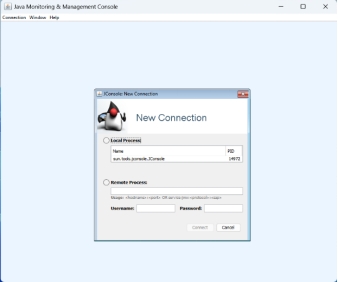
Select remote process, fill host_name/port_number niit(your_hostname):9988 (port or port number on which you enabled JMX) and user and password for the remote system, then click connect.
选择远程进程,填写 host_name/port_number 例如 niit(your_hostname):9988(即您启用 JMX 的端口号)以及远程系统的用户名和密码,然后点击连接。
