Sqoop is a tool for efficient bulk data transfer between Hadoop Distributed File System (HDFS) and Relational Database Management System (RDBMS).
- Sqoop 是一个用于在 Hadoop 分布式文件系统 (HDFS) 与关系数据库管理系统 (RDBMS) 之间进行高效批量数据传输的工具。
Sqoop was incubated as an Apache top-level project in March 2012.
- Sqoop 于 2012 年 3 月正式成为 Apache 顶级项目。
Sqoop is an open source tool for data transfer between Hadoop (including Hive, HBase and other HDFS-based data storages) and traditional relational databases (MySQL, Oracle, PostgreSQL, etc).
- Sqoop 是一个开源工具,用于在 Hadoop(包括 Hive、HBase 和其他基于 HDFS 的数据存储)与传统关系数据库(MySQL、Oracle、PostgreSQL 等)之间传输数据。
Sqoop can import data from a relational database into Hadoop HDFS including Hive, HBase and other HDFS-based data storages.
- Sqoop 可以将数据从关系数据库导入 Hadoop HDFS,包括 Hive、HBase 和其他基于 HDFS 的数据存储。
Sqoop can export data from HDFS to a relational database in turn MySQL, Oracle, PostgreSQL, etc.
- 相应地,Sqoop 也可以将数据从 HDFS 导出到 MySQL、Oracle、PostgreSQL 等关系数据库。
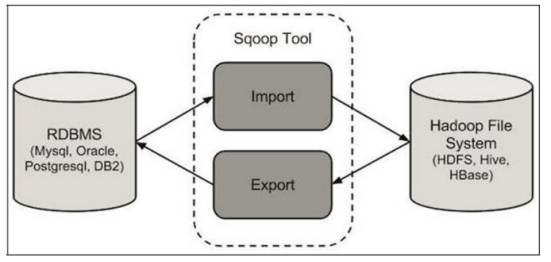
The following diagram shows the workflow of Sqoop’s import and export operations:
下图展示了 Sqoop 导入和导出操作的工作流程:
![img]()
Advantages of Sqoop1
- Sqoop1 的优点
- Connector-based, simple architecture, easy to deploy
- 基于连接器,架构简单,易于部署
- Can be used in production environment
- 可用于生产环境
Disadvantages of Sqoop1
- Sqoop1 的缺点
- Can only be called by CLI (command line), errors often happen when using wrong parameters
- 只能通过 CLI(命令行)调用,使用错误的参数时经常出错
- Unclear type mapping definition
- 类型映射定义不清晰
- Security concerns
- 安全性顾虑
- The sqoop client needs to connect directly to Hadoop and the database
- Sqoop 客户端需要直接连接 Hadoop 和数据库
- The Connector must conform to the JDBC model
- 连接器必须符合 JDBC 模型
Advantages of Sqoop2
- Sqoop2 的优点
- Introduce Sqoop Server for centralized management for Connector or other third-party plugins
- 引入了 Sqoop Server,对连接器或其他第三方插件进行集中管理
- Support multiple methods to access Sqoop Server: CLI, WEB UI, REST API
- 支持多种访问 Sqoop Server 的方式:CLI、Web UI、REST API
- Introduce role-based security mechanism, administrator can configure different roles on Sqoop Server
- 引入了基于角色的安全机制,管理员可以在 Sqoop Server 上配置不同的角色
Disadvantages of Sqoop2
- Sqoop2 的缺点
- Slightly more complex architecture
- 架构稍微复杂一些
- Difficult to config and deploy
- 配置和部署较困难
- Incomplete characteristics
- 特性不完整
- Cannot be used in production environment
- 无法用于生产环境
How Sqoop works
- Sqoop 的工作原理
- Sqoop works by translating import or export commands into MapReduce jobs
- Sqoop 的工作原理是将导入或导出命令转换为 MapReduce 作业
- In the translated MapReduce job, the InputFormat and OutputFormat can be customized to achieve import or export function
- 在转换后的 MapReduce 作业中,可以自定义 InputFormat 和 OutputFormat 以实现导入或导出功能
- Sqoop can take advantage of MapReduce’s parallelism and fault tolerance to implement import and export operations
- Sqoop 可以利用 MapReduce 的并行性和容错性来实现导入和导出操作
Sqoop import principle
- Sqoop 导入原理
- Sqoop-import tool imports a single table from RDBMS to HDFS
- Sqoop-import 工具将单个表从 RDBMS 导入到 HDFS
- Each row in the table is represented as a separate record in HDFS
- 表中的每一行在 HDFS 中表示为一条单独的记录
- The records can be stored as text files (each row or text is considered as one record) or in binary representation as Avro or SequenceFile data format
- 记录可以存储为文本文件(每一行文本视为一条记录),也可以存储为 Avro 或 SequenceFile 等二进制格式
- There is also a Sqoop-import-all-tables tool which is used to import multiple tables from RDBMS to HDFS at once, with each table’s data stored in a separate folder
- 还有一个 Sqoop-import-all-tables 工具,用于一次性将多个表从 RDBMS 导入到 HDFS,每个表的数据存储在单独的文件夹中
Sqoop-import tool has three different ways to import data
- Sqoop-import 工具提供了三种不同的数据导入方式:
- Full import: Import full amount of data
- 全量导入: 导入全部数据
- Partial import: import some columns or some rows of data
- 部分导入: 导入某些列或某些行的数据
- Incremental import: import only the new data
- 增量导入: 仅导入新数据
Sqoop export principle
- Sqoop 导出原理
- Sqoop-export tool is used to export a set of files from HDFS back to RDBMS
- Sqoop-export 工具用于将一组文件从 HDFS 导出回 RDBMS
- Currently the target table must already exist in the database
- 目前,目标表必须已存在于数据库中
- Sqoop-export tool reads the input file according to the user-specified delimiter and parses it into a set of records
- Sqoop-export 工具根据用户指定的分隔符读取输入文件,并将其解析为一组记录
Sqoop-export tool include three different ways to export data:
- Sqoop-export 工具包括三种不同的数据导出方式:
- Insert mode: The default operation is to insert the data from the file into the table using the INSERT statement
- 插入模式:默认操作是使用 INSERT 语句将文件中的数据插入到表中
- Update mode: Sqoop will use UPDATE statements to replace existing records in the database
- 更新模式:Sqoop 将使用 UPDATE 语句替换数据库中的现有记录
- Call mode: Sqoop will call a stored procedure from database for exporting each record
- 调用模式:Sqoop 将调用数据库存储过程来导出每条记录