Chapter 6
第 6 章
Spark SQL
Spark SQL
Spark SQL is a module for structured data processing in Apache Spark. It allows users to run SQL queries, use DataFrame and Dataset APIs, and seamlessly mix SQL queries with Spark programs.
Spark SQL 是 Apache Spark 中用于结构化数据处理的模块。它允许用户运行 SQL 查询、使用 DataFrame 和 Dataset API,并将 SQL 查询与 Spark 程序无缝结合。
Unified Data Access:
统一数据访问:
Spark SQL integrates with a variety of data sources, including Hive, Avro, Parquet, ORC, JSON, and JDBC. It allows you to query data from these sources using SQL and combine it with Spark’s programmatic API.
Spark SQL 可以集成多种数据源,包括 Hive、Avro、Parquet、ORC、JSON 和 JDBC。它允许你使用 SQL 查询这些数据源,并与 Spark 的编程 API 结合使用。
Schema Management:
模式管理:
It provides a way to manage structured data using schemas, allowing for better data governance and query optimization.
它提供了一种通过模式(Schema)来管理结构化数据的方式,从而实现更好的数据治理和查询优化。
Compatibility with Hive:
与 Hive 的兼容性:
Spark SQL supports querying data stored in Apache Hive, and it can read Hive tables, run Hive UDFs, and execute Hive queries.
Spark SQL 支持查询存储在 Apache Hive 中的数据,可以读取 Hive 表、运行 Hive UDF,并执行 Hive 查询。
SQL and DataFrame API:
SQL 和 DataFrame API:
Allows users to write queries using SQL or DataFrame DSL (Domain-Specific Language), making it flexible for users from different backgrounds.
允许用户使用 SQL 或 DataFrame DSL(领域特定语言)来编写查询,使不同背景的用户都能灵活使用。
DataFrames and Datasets
DataFrame 和 Dataset
DataFrame: A distributed collection of data organized into named columns, similar to a table in a relational database.
DataFrame:按具名列组织的分布式数据集合,类似于关系型数据库中的一张表。
Dataset: A strongly-typed, distributed collection of data. Datasets provide the benefits of RDDs (type safety and object-oriented programming) along with the optimizations available with DataFrames.
Dataset:具有强类型的分布式数据集合。Dataset 同时具备 RDD 的优点(类型安全和面向对象编程)以及 DataFrame 所提供的优化能力。
Create DataFrame
创建 DataFrame
RDD to DataFrame
RDD 转 DataFrame
1 | val dataRdd = sc.parallelize(1 to 10).map(x => (x, "HNU")) |

This RDD has number 1 to 10 with HNU.
这个 RDD 包含从 1 到 10 的数字,并为每个数字关联字符串 “HNU”。
To check the data, we have to perform action collect.
要查看数据,我们需要执行 action 操作 collect。
1 | dataRdd.collect |

To Create RDD to DataFrame.
将这个 RDD 转换为 DataFrame。
1 | val dataDF = dataRdd.toDF("id","university") |

Display Data:
显示数据:
1 | dataDF.show |
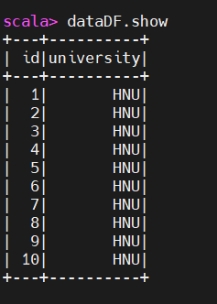
Creating Data Frames using Spark SQL
使用 Spark SQL 创建 DataFrame
Create data using spark.sql
使用 spark.sql 创建数据
1 | import org.apache.spark.sql.Row |

1 | studentRdd.collect |

Creating Schema for Data
为数据创建模式(Schema)
1 | import org.apache.spark.sql.types._ |

Create DF (data in schema) using Spark Session
使用 SparkSession 按模式创建 DataFrame
1 | val studentDF = spark.createDataFrame(studentRdd,schema) |

1 | studentDF.show |
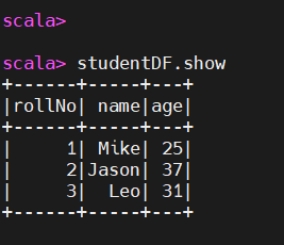
Creating DF for Text File.
为文本文件创建 DataFrame。
Creating RDD.
创建 RDD。
1 | val dataRdd = sc.textFile("/root/Documents/movie.txt") |

Create DF for textFile:
从 textFile 创建 DataFrame:
1 | val dataDf = dataRdd.map(x => x.split(",")).map(x => |
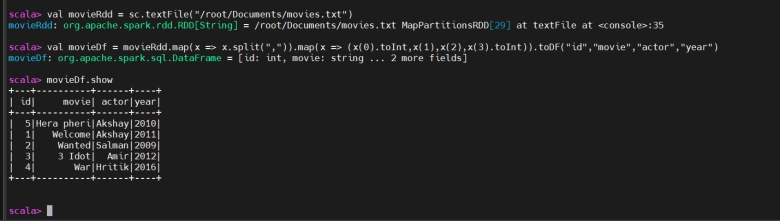
Save Output in a csv file:
将输出保存为 CSV 文件:
1 | dataDf.write.option("header","true").csv("/root/Documents/movies.csv") |

Creating DF for csv using sparksession:
使用 SparkSession 为 CSV 文件创建 DataFrame:
1 | val dataDf = spark.read.option("header", "true").option(“inferSchema”,”true”).csv("") |
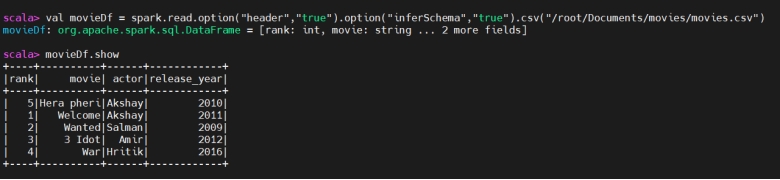
Creating DF using Parquet
使用 Parquet 创建 DataFrame
1 | Val dataDf = spark.read.load("") |
Creating DF using Json
使用 JSON 创建 DataFrame
1 | Val dataDf = spark.read.json("") |
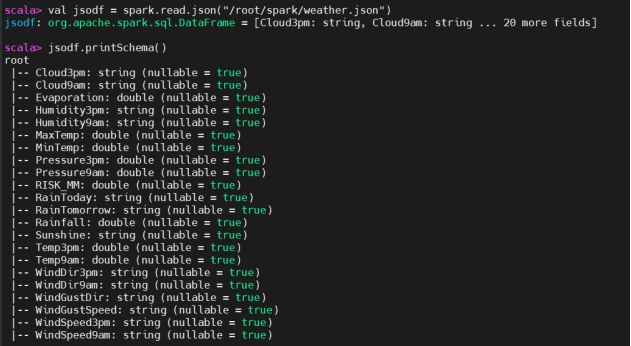
dataDf.show
Creating DF using mysql table
使用 MySQL 表创建 DataFrame
Before starting spark-shell copy mysql connector (mysql-connector-j-8.0.31.jar) to spark’s jars folder. Also create global account in mysql.
在启动 spark-shell 之前,将 MySQL 连接器(mysql-connector-j-8.0.31.jar)复制到 Spark 的 jars 目录中。同时在 MySQL 中创建一个全局账号。
1 | val mysqlurl = "jdbc:mysql://192.168.56.1:3306/sakila" |
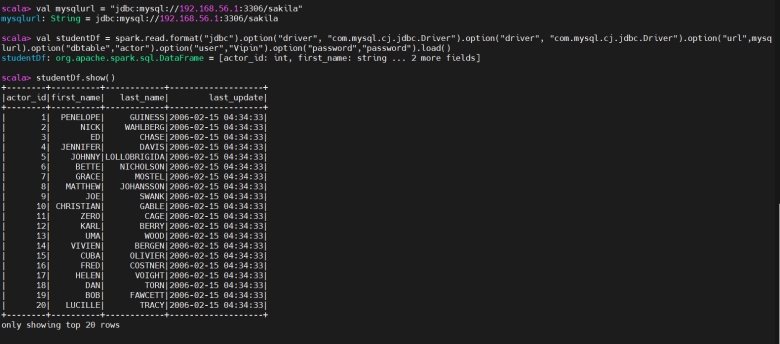
Without view
不使用视图
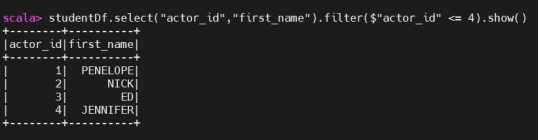
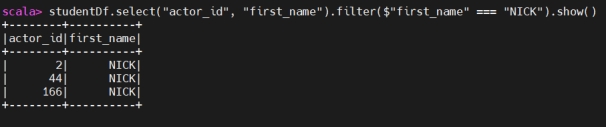
Write code
编写代码
1 | studentDf.select("actor_id","first_name").filter($"actor_id" ===4).show() |
Create View for query
为查询创建视图
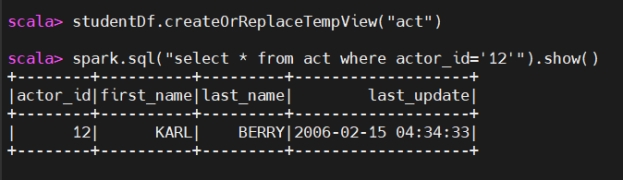
View
视图
We have to create temporary view.
我们需要创建临时视图。
Creating a view allows you to execute SQL queries directly on DataFrames. This is particularly useful for users who are more comfortable with SQL than with DataFrame operations. By creating a view, you can leverage the full power of SQL for data querying and manipulation.
创建视图可以让你在 DataFrame 之上直接执行 SQL 查询。对于比起 DataFrame 操作更熟悉 SQL 的用户,这尤其有用。通过视图,你可以充分利用 SQL 的能力进行数据查询和处理。
Once you register a DataFrame as a view, you can reuse this view across multiple SQL queries without having to re-specify the DataFrame transformations. This can simplify your code and make it more modular.
一旦将 DataFrame 注册成视图,你就可以在多条 SQL 语句中重复使用该视图,而无需重新编写 DataFrame 的转换逻辑。这能简化代码并使其更加模块化。
Types of view
视图的类型
In Spark SQL, there are several types of views you can create, each with its specific use cases and characteristics. The main types of views are:
在 Spark SQL 中,可以创建多种类型的视图,每种视图都有各自适用的场景和特点。主要的视图类型包括:
1. Temporary Views
1. 临时视图
Characteristics:
特点:
Session-Scope: Temporary views are visible only within the session in which they are created.
会话范围:临时视图只在创建它的会话内可见。
Lifetime: They exist only for the duration of the Spark session and are dropped when the session terminates.
生命周期:临时视图只在 Spark 会话存活期间存在,会话结束时会自动删除。
Purpose: Useful for intermediate computations and simplifying complex queries within a session.
用途:适合做会话内的中间计算,并简化复杂查询。
Create Temporary view:
创建临时视图:
1 | movieDf.createOrReplaceTempView("people") |
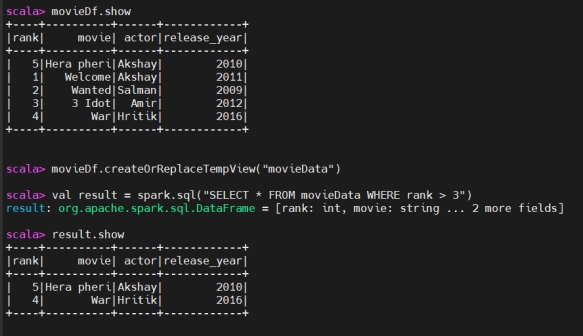
2. Global Temporary Views
2. 全局临时视图
If we have multiple users and we want to provide view for all users, we have to create global view.
如果有多个用户都需要访问同一个视图,就需要创建全局视图。
Characteristics:
特点:
Global Scope: Global temporary views are visible across all sessions.
全局范围:全局临时视图在所有会话中都可见。
Shared Database: They are stored in a system database named global_temp and can be accessed using global_temp.view_name.
共享数据库:全局临时视图存放在名为 global_temp 的系统数据库中,可通过 global_temp.view_name 访问。
Lifetime: They persist as long as the Spark application is running.
生命周期:只要 Spark 应用在运行,全局临时视图就会一直存在。
1 | # Create a global temporary view |
SQL Query:
SQL 查询:
1 | spark.sql(“select * from view_name”).show |
Data From Hive
来自 Hive 的数据
Before starting spark-shell copy mysql connector (mysql-connector-j-8.0.31.jar) to spark’s jars folder. Also create global account in mysql.
在启动 spark-shell 之前,将 MySQL 连接器(mysql-connector-j-8.0.31.jar)复制到 Spark 的 jars 目录中。同时在 MySQL 中创建一个全局账号。
1 | sc.setLoglevel(“Error”) |
Save Data in a File:
将数据保存到文件:
1 | spark.sql("select * from vipin.user_info").write.format("parquet ").save("/root/spark/vipin") |
Spark SQL Platform
Spark SQL 平台
Command to start Spark SQL shell.
启动 Spark SQL Shell 的命令。
1 | spark-sql |
CSV File
CSV 文件
1 | CREATE TABLE my_table1 USING CSV OPTIONS ( |


MySQL
MySQL
Create Temporary view of mysql table:
为 MySQL 表创建临时视图:
1 | CREATE TEMPORARY VIEW actors USING org.apache.spark.sql.jdbc |
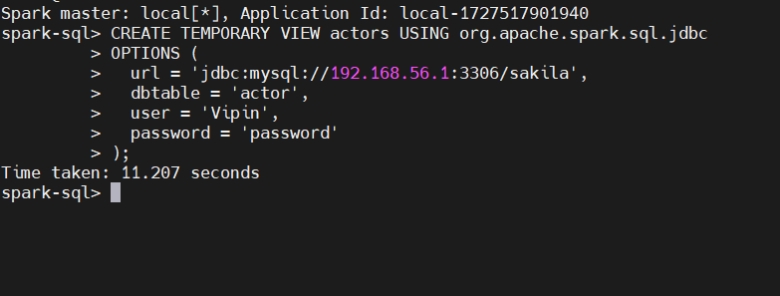
1 | show tables; |
Spark SQL with Hive
结合 Hive 使用 Spark SQL
1 | show databases; |
